Appearance
IntelliTrack Q1 2025 Release Notes
Released: March 2025
Quarterly release introducing three major features - rebranding to DecisionPoint Technologies, Cost Center Sites, and Dispatch Requests - along with new features, improvements, and fixes for the general platform, VeriMy Gen2, the Mobile Client, and the IT Assets, Fixed Assets, and Consumable Inventory bundles.
Rebranding to DecisionPoint Technologies
IntelliTrack has been rebranded to reflect the new company name, DecisionPoint Technologies. Updates included, but were not limited to the following:
- Name and Domain
- Logo and Color
- Email Address from @barcoding.com to @decisionpt.com
- Play Store App Listing Pages for IntelliTrack Mobile and VeriMy
Cost Center Sites
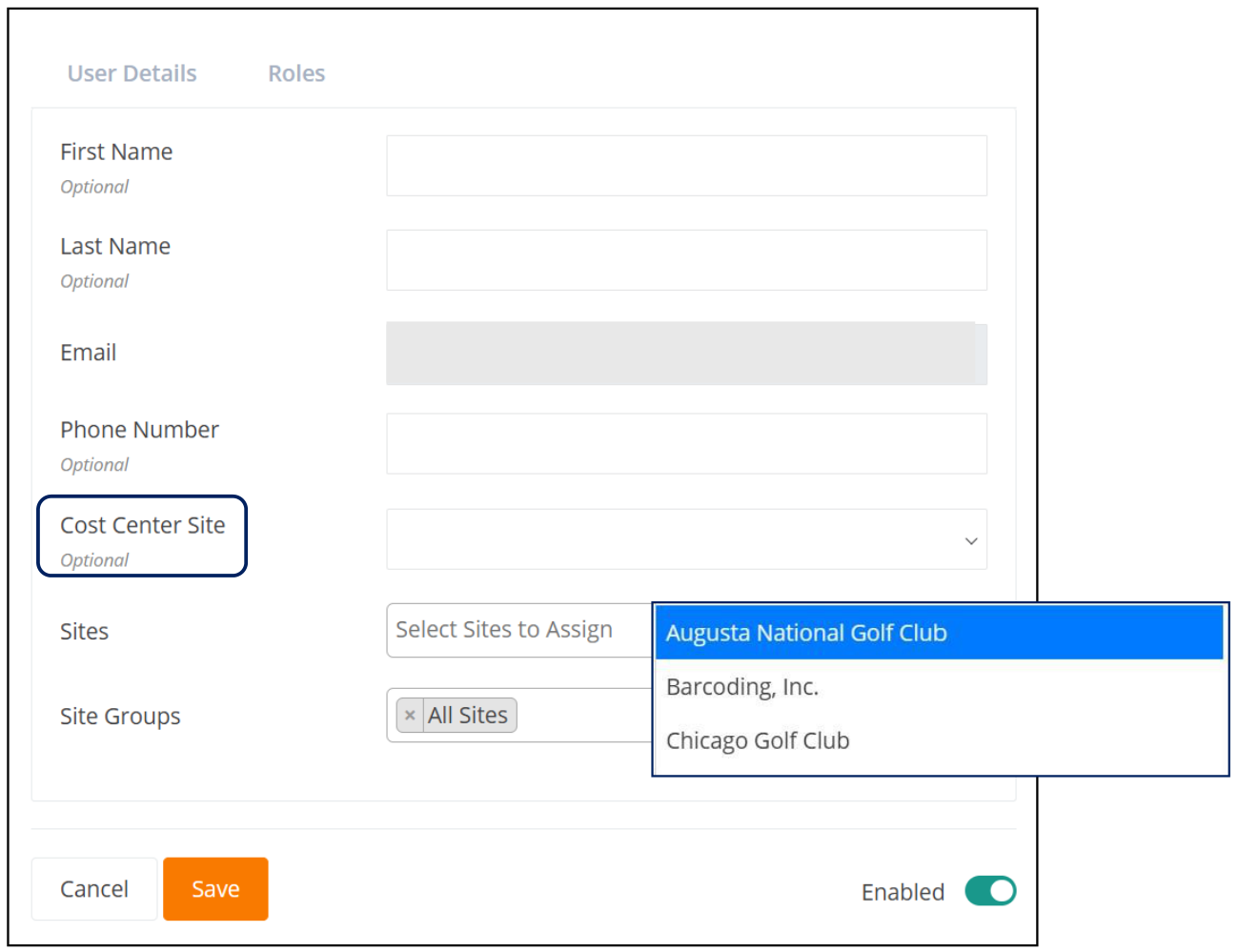
Administrators now have the option to enter a Cost Center Site when adding or editing a User by selecting from the dropdown list of Sites available.
Note: The Cost Center Site can also be incorporated when performing a User Import via the .csv template that is provided. The Cost Center Site field is optional.
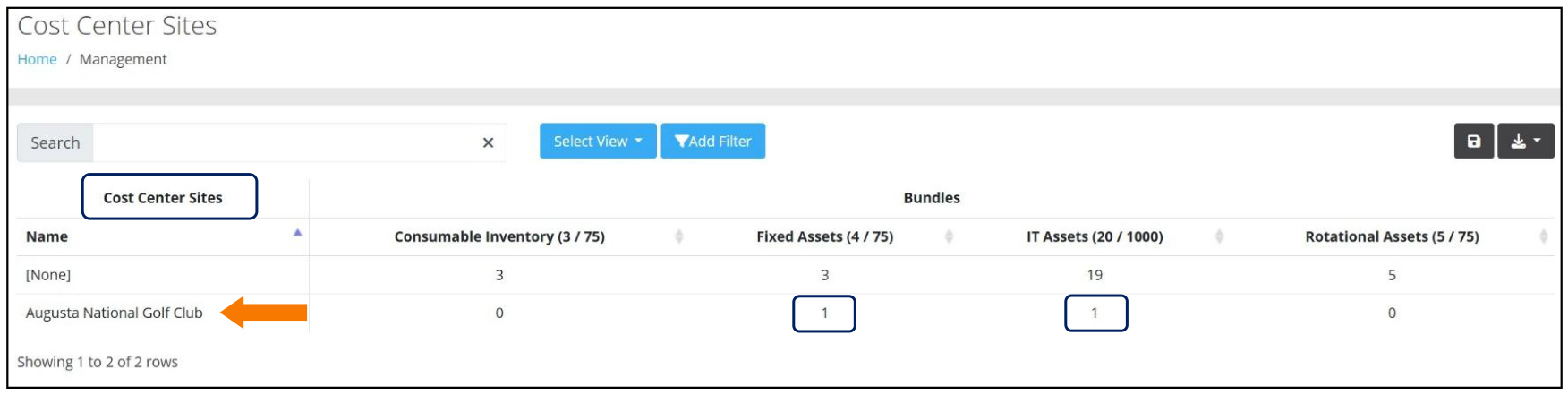
Once a Cost Center Site has been assigned to a User, it will be displayed on the Cost Center Sites page, which is accessed via the Management > Users > Cost Center Sites menu option.
This allows Administrators to view Cost Center Sites that have been assigned to Users along with their associated bundles.
Dispatch Requests
As a result of implementing Service Requests Tenant Settings, a new feature for creating Dispatch Requests is now available. This feature provides an Administrator with a means to enter a "request for service".
Note: This functionality is dependent upon the Tenant having the "Dispatch Requests" bundle.
Also Note: The Item Number of the Asset needs to have "Service Request Availability" toggled on for the Dispatch Request to be recognized.
Dispatch Requests can be viewed individually or as a list of all requests. In addition, a new request can be added, as summarized below.
Note: This feature, which is Permission Based, requires the IT Assets bundle.
Viewing Dispatch Requests
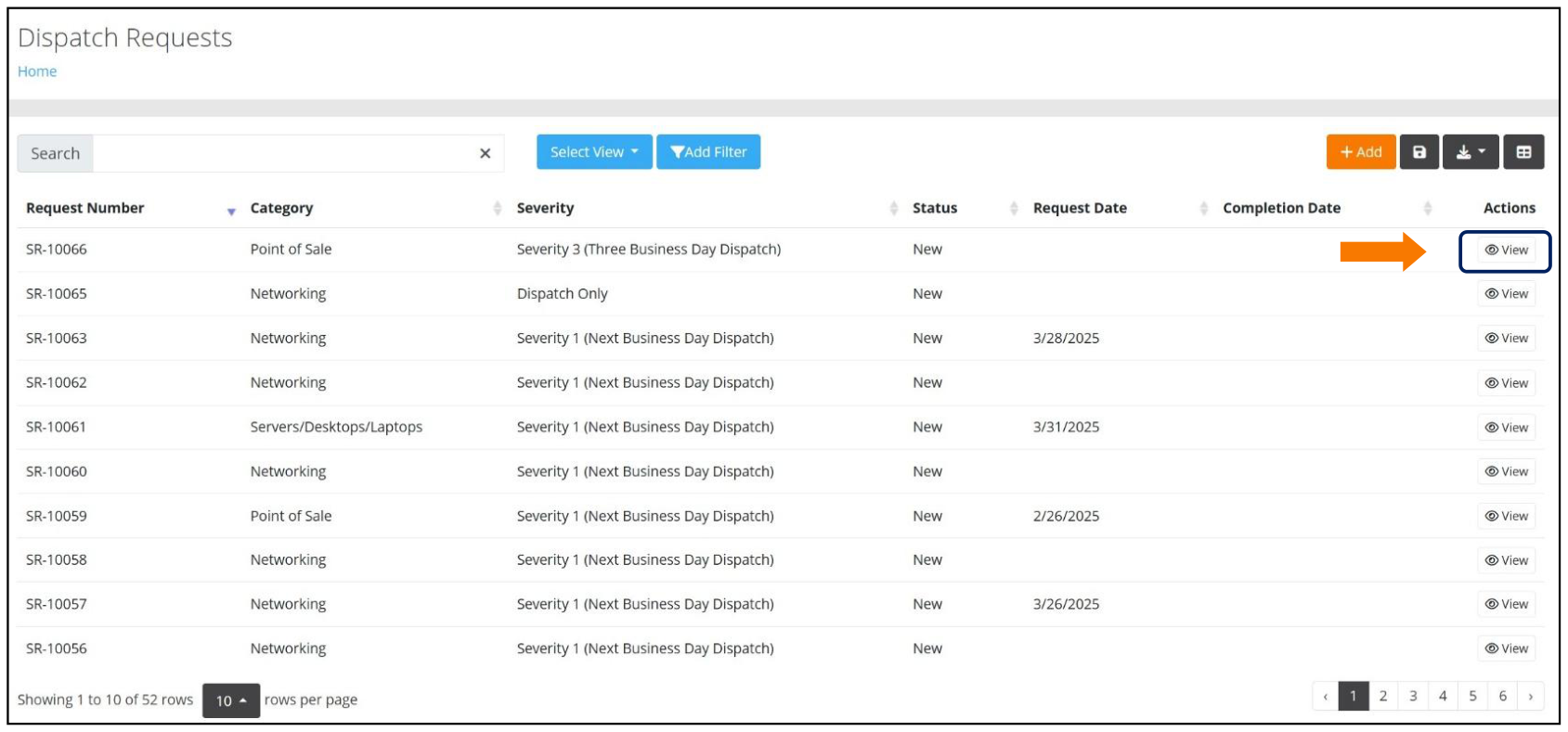
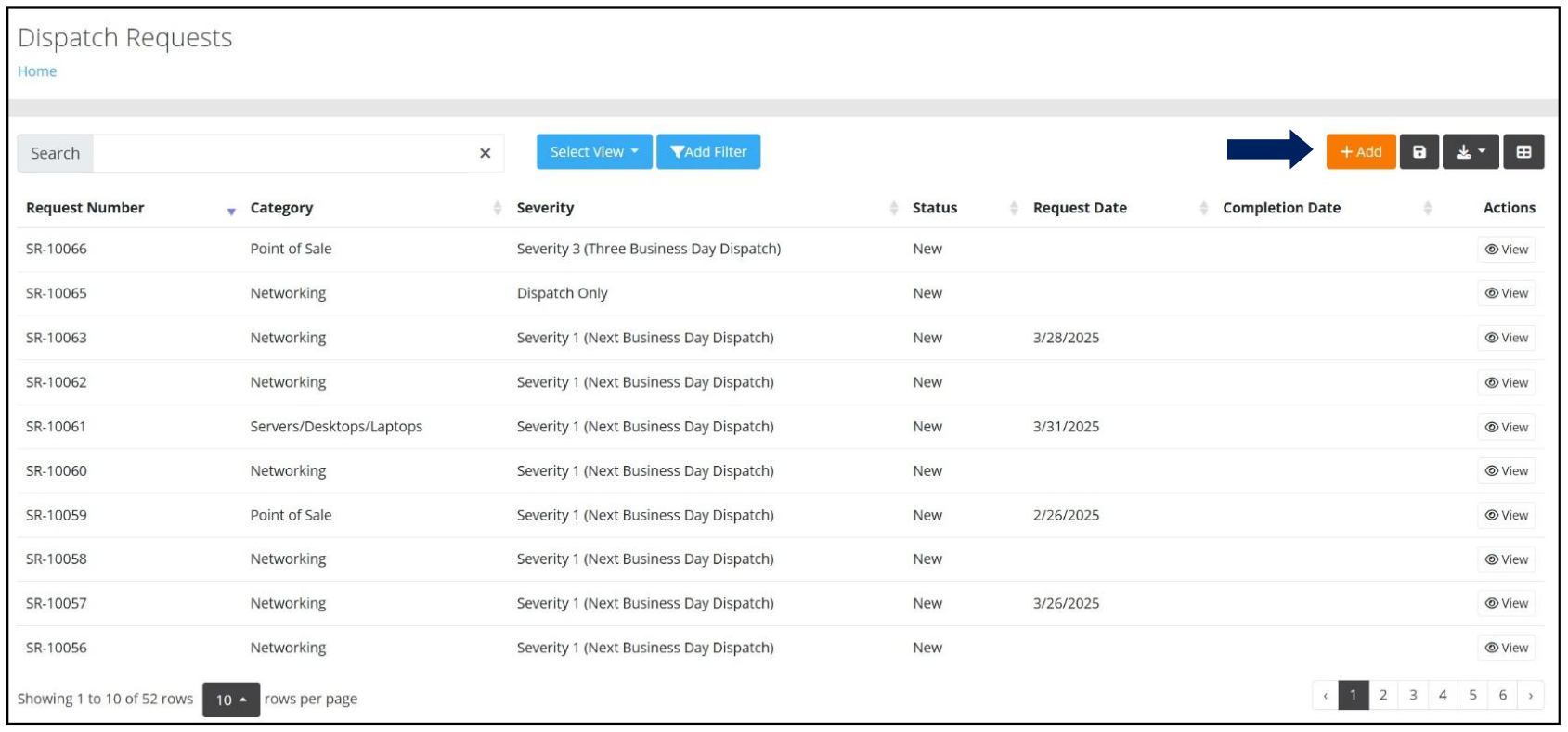
After selecting Dispatch Requests from the Main menu, the Dispatch Requests page is displayed, which contains all requests in chronological order from most recent, as seen below.
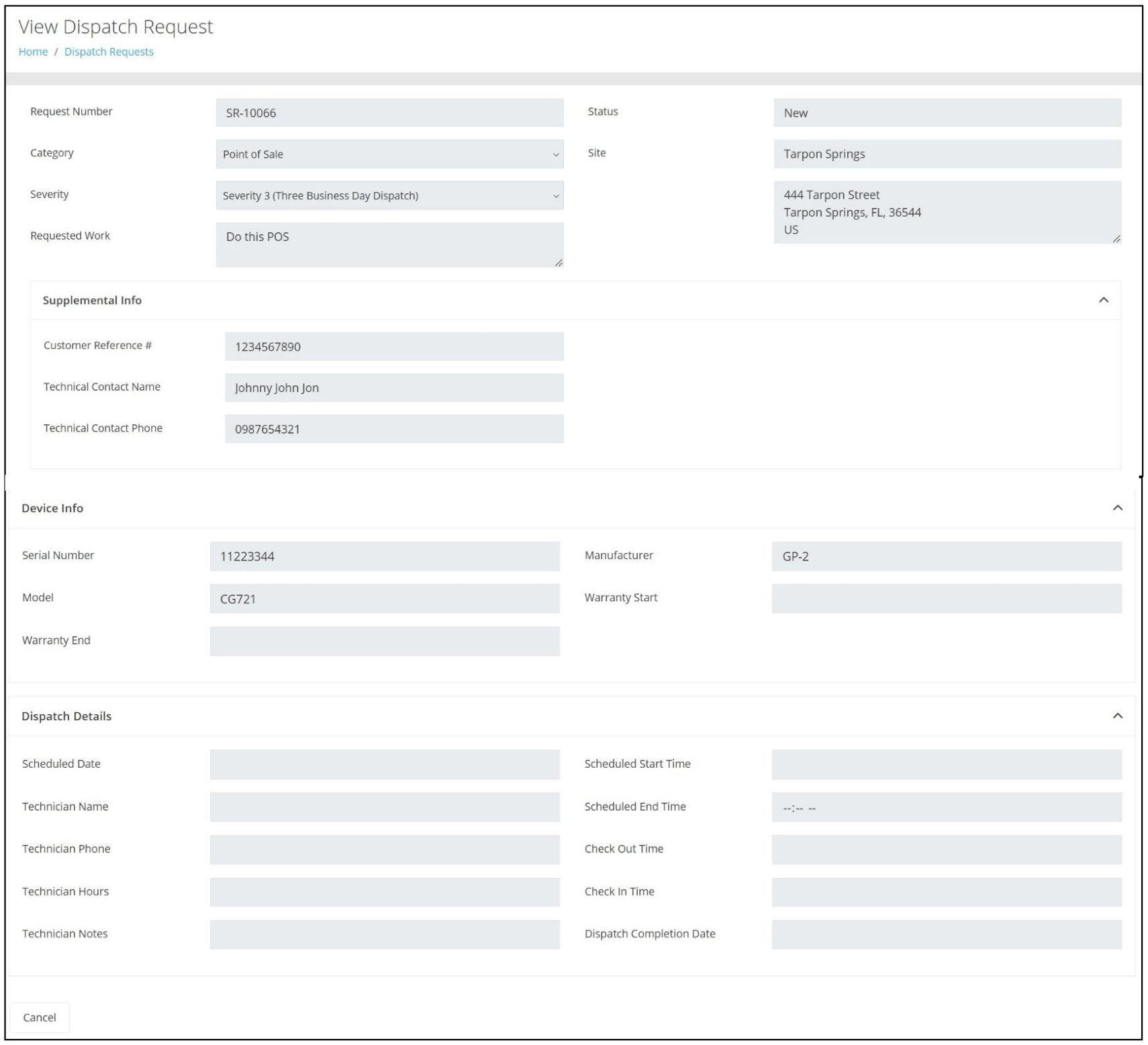
From the Dispatch Requests page, the User can view an individual request by locating the request from the list displayed, via a Search, or by applying a filter. Once located, clicking on View under the Actions options will launch the View Dispatch Request page for the request chosen.
Adding a Dispatch Request
From the Dispatch Requests page, the User can add a new request by clicking on the Add button.
On the Add Dispatch Request page, complete the required fields as follows:
- Category - Select from a Dropdown List
- Severity - Select from a Dropdown List
- Requested Work - Enter Details of the Service Needed
- Site - Enter the Site - Note: This is a Type Ahead Entry
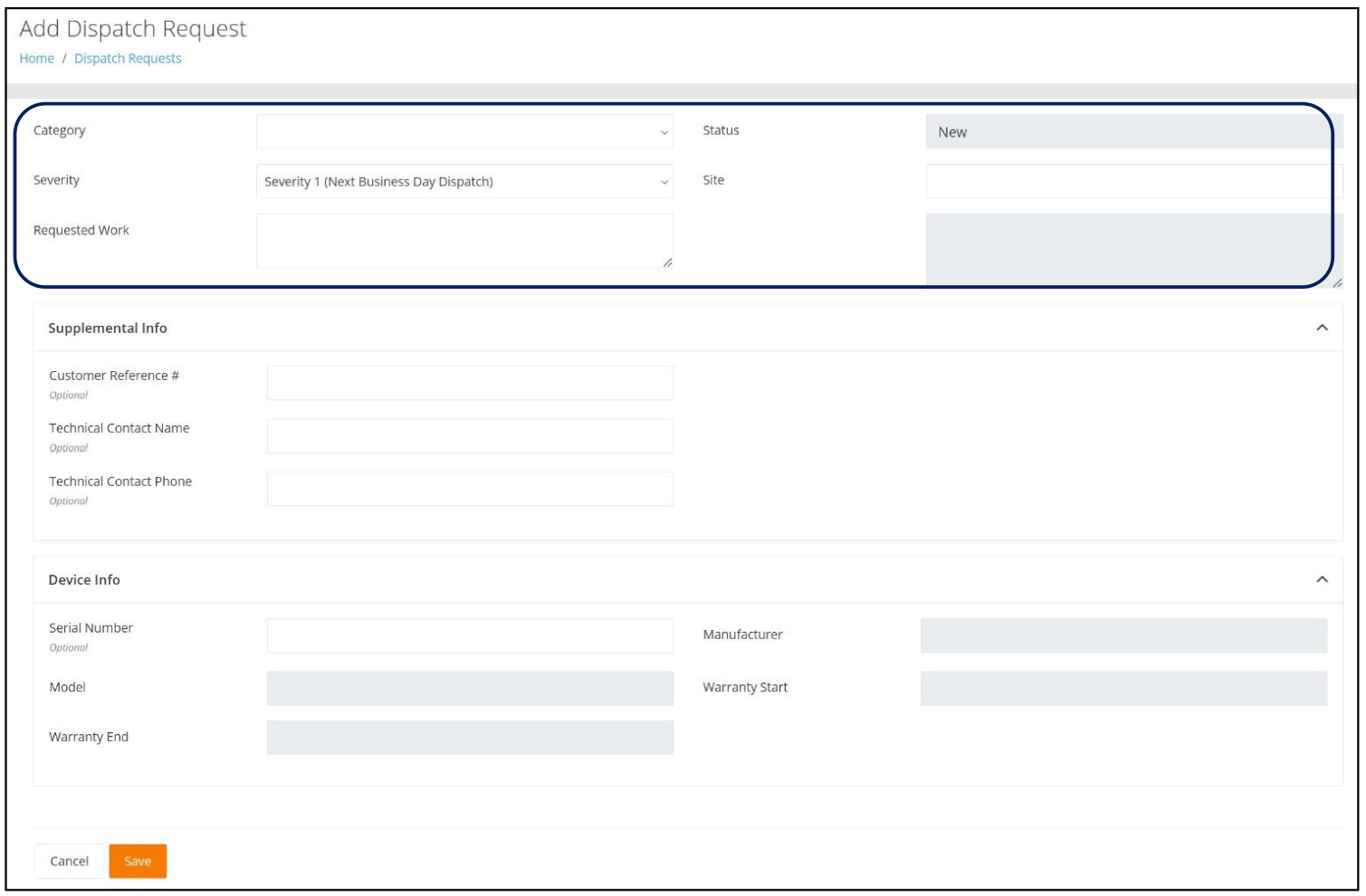
In addition, there are optional fields that can be populated in the following categories:
- Supplemental Info
- Customer Reference #
- Technical Contact Name
- Technical Contact Phone
- Device Info
- Serial Number
- Model
- Manufacturer
- Warranty Start
- Warranty End
Note: Upon entering a valid Serial Number, the Manufacturer and Model fields will be populated.
Upon completing the form, click on Save. The newly created request will now be displayed on the Dispatch Requests page.
General Platform
New Features
- An alert is now sent to Administrators when an App Credential is about to expire.
- A new Query Parameter for Site and Site Group has been implemented when creating a Dashboard.
Improvements
Performance
Continual improvements have been implemented throughout the platform. These include but are not limited to loading pages that contain a large volume of data, such as the Assignees page, which can potentially include thousands of Assignees, as well as the Packing List Report.
Subscriptions
Continual improvements to subscriptions have also been implemented, which include but are not limited to the following:
- Ability to subscribe to a Saved View.
- Updates to Assignee and Service Contracts subscriptions.
- Delivery of Emails for Subscriptions that contain Filters and Filtered Item Groups.
Fixed
- The Edit button on the Units of Measure tab now works as expected when Adding an Item.
- A Layout Adjustment on the Insights page has been made so that the Actions options are now Right Justified.
- When adding a new Item, the "optional" Unit Cost field found on the Units of Measure tab now properly displays decimals.
- When adding assets via the Add Multiple feature, the User is now captured in the Asset History record for the "Asset has been created" and "Asset location has been sent" events.
- Importing Assets from a .csv file that contains Duplicate Serial Numbers and/or Retired Assets no longer prevents a successful import and produces an email notification of the failed results.
VeriMy Gen2
New Features
Store and Forward
This functionality ensures that if Check Outs and Check Ins occur while disconnected, or if IntelliTrack is unable to be reached, transactions will be stored until connectivity is restored.
Note: The upload of stored records may take several minutes as Store/Forward uploads are throttled. Asset History will reflect the actual time of Check Out/Check In once the transactions are uploaded.
Users can now Add/Edit Check Out Assignees and View the Check Out Assets and Past Due Assets Reports.
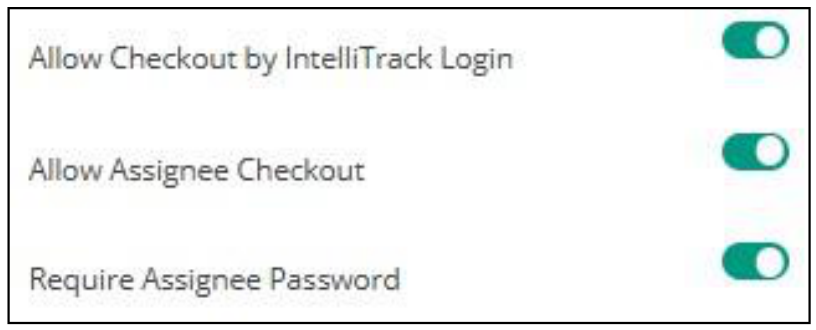
New Tenant Settings, as seen below, have been implemented that allows an Administrator to determine how VeriMy Checkouts behave on a device.
Note: "Allow Assignee Checkout" must be toggled on for the Password to be required.
Fixed
- If a user on the IntelliTrack Assets Details page invokes the Locate command multiple times within a short period of time, VeriMy™ may crash and restart.
- Changes have been implemented to improve the application's overall stability.
- The Login Failed message has been modified to notify the User when VeriMy is disabled.
- The Calculator feature is now functional.
- Asset History records are now properly recorded when an Asset has VeriMy Enabled or Disabled.
- Customer logos that have been replaced via Tenant Settings are now properly displayed without requiring the application to be uninstalled or reinstalled.
Mobile Client
Improvements
- The RFID Read and Audio enhancements for RFID Locate have been improved.
Fixed
- A new Cycle Count can now be created successfully.
IT Assets Bundle
New Features
A Customer Site ID field, when applicable, is now contained in the "RMA Request Confirmation - DecisionPoint" Email Notification.
The name of the RMA Creator is now contained within the "Ship Repaired Items To" section of the Packing Slip. This Contact information will be displayed on the "Content Label" that is generated by Honeywell and placed on the shipment back to the Customer, which will serve to greatly improve successful deliveries.
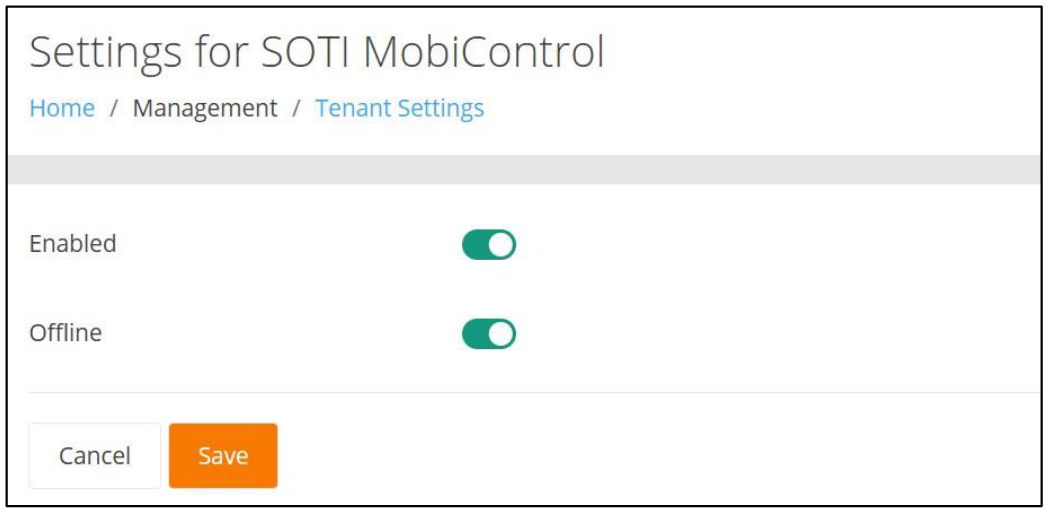
A new Tenant Settings has been implemented to enable an Offline Sync between IntelliTrack and SOTI.
This new feature will enable Administrators to import a .csv file that contains the SOTI Device ID, which results in moving the Assets to their respective Sites. If the Asset is not found in IntelliTrack, it will be reported on the email notification .txt file, but it will not automatically move the Asset.
Note: This functionality is dependent upon mapping the Sites to a SOTI Path in IntelliTrack.
Fixed
- The Carrier Hyperlink, found on the RMA Details page for the "Shipped from Repair Depot" event, no longer launches the FedEx website for a UPS Tracking #.
Fixed Asset Bundle
Cycle Count
New Features
- The Cycle Count menu is now available for RFID and Non-RFID Handhelds.
- When the Handheld is a Non-RFID Handheld, the barcode scanner will perform the Cycle Count.
Fixed
- The Mobile client now uses the selected Site for the device when creating a new Cycle Count.
- A "Cancel Count" prompt now appears when the device's Back button is pressed. The prompt alerts the User that exiting the screen will result in losing the counts.
- The Cycle Count selector now only displays those counts where the Count's Site matches the Mobile Client's Default Site.
- When the logged-in User does not have access to the Site-Location for a Cycle Count, an error no longer appears when the View button is pressed at the View Cycle Count page.
Consumable Inventory Bundle
Fixed
- An Item can now be Issued from a Location as well as Added to a Receipt Order when a # sign is contained within the Location's Name.
- At the Edit Receiving and Edit Picking pages, the addition of a Line Item Note now properly handles special characters, such as #, &, or +.