Appearance
IntelliTrack Q3 2025 Release Notes
Released: October 2025
Quarterly release introducing Container Enhancements - Check Out, Check In, and Issue Consumable Item - along with new features, improvements, and fixes for the general platform, VeriMy, the Mobile Client, and the IT Assets, Rotational Assets, Fixed Assets, and Consumable Inventory bundles.
Container Enhancements
Container Check Out / Check In functionality, designed to streamline Container tracking and improve efficiency, has been implemented. Users can now perform a Check Out / Check In of an entire Container.
From the redesigned Check Out page, seen below, the User can Check Out Assets, Containers, as well as Issue Consumable Items, if they have the proper permissions and bundles.
Note: The Check Out / Check In feature requires the Rotational Assets bundle while the Issue Consumable Item feature requires the Consumable Inventory bundle.
Check Out
The functionality for Checking Out an Asset remains unchanged:
- Select an Assignee.
- Enter the Asset Number into the renamed Asset Number/Container Number field.
- Click on the Check Out button.
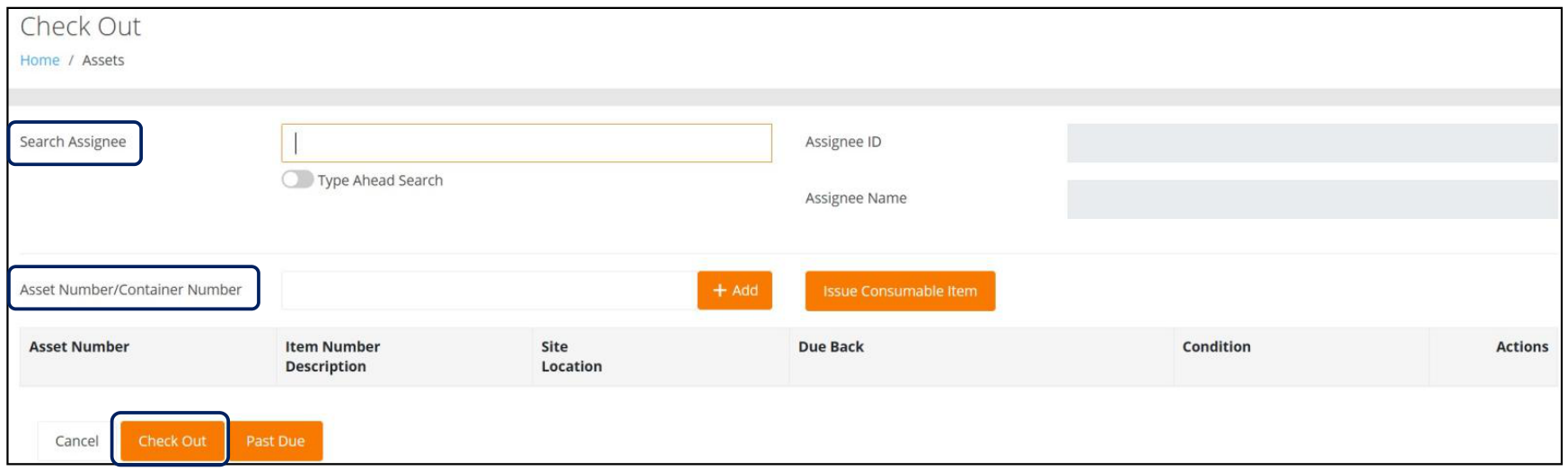
To Check Out a Container, the User will:
- Select an Assignee.
- Enter the Container Number into the renamed Asset Number/Container Number field.
- Click on the Check Out button.
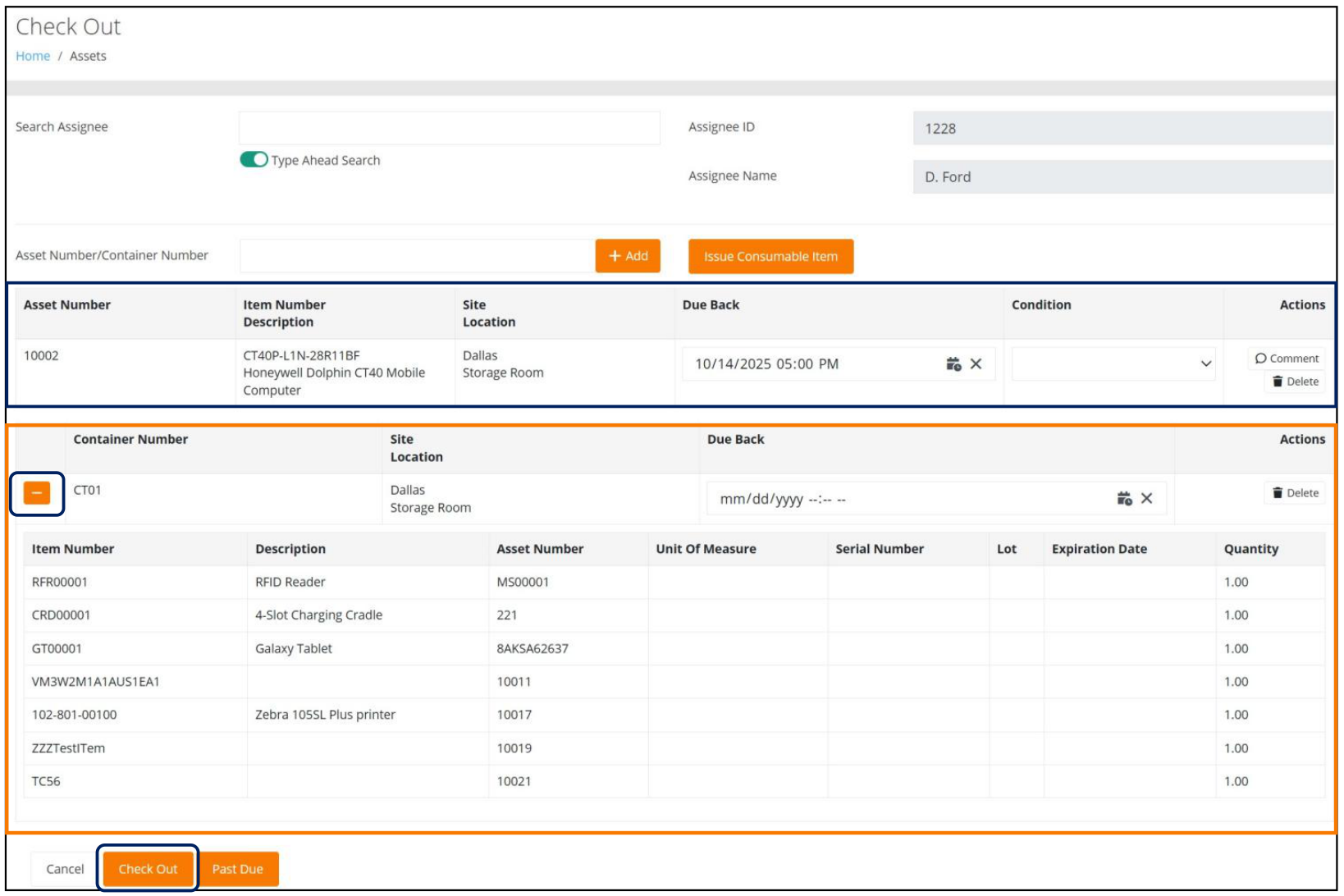
Each checked out entity, either an Asset or a Container, will be displayed in its own table, as seen in the screenshot that follows. In addition, the Container can be expanded to display the contents that are being checked out. Once it has been checked out, a Checked Out icon will be displayed on the Containers page.
Note:
- An empty Container cannot be checked out.
- A Container that is already checked out cannot be checked out again.
Check In
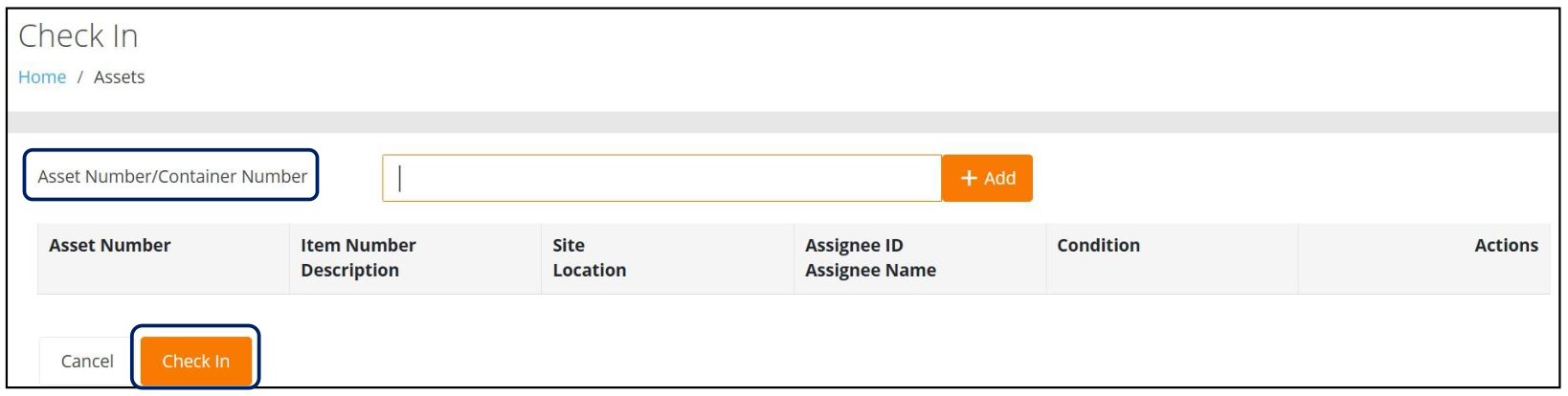
From the redesigned Check In page, seen below, the User can Check In Assets as well as Containers following the same procedure outlined above by entering either the Asset Number or the Container Number that is being checked in.
Issue Consumable Item
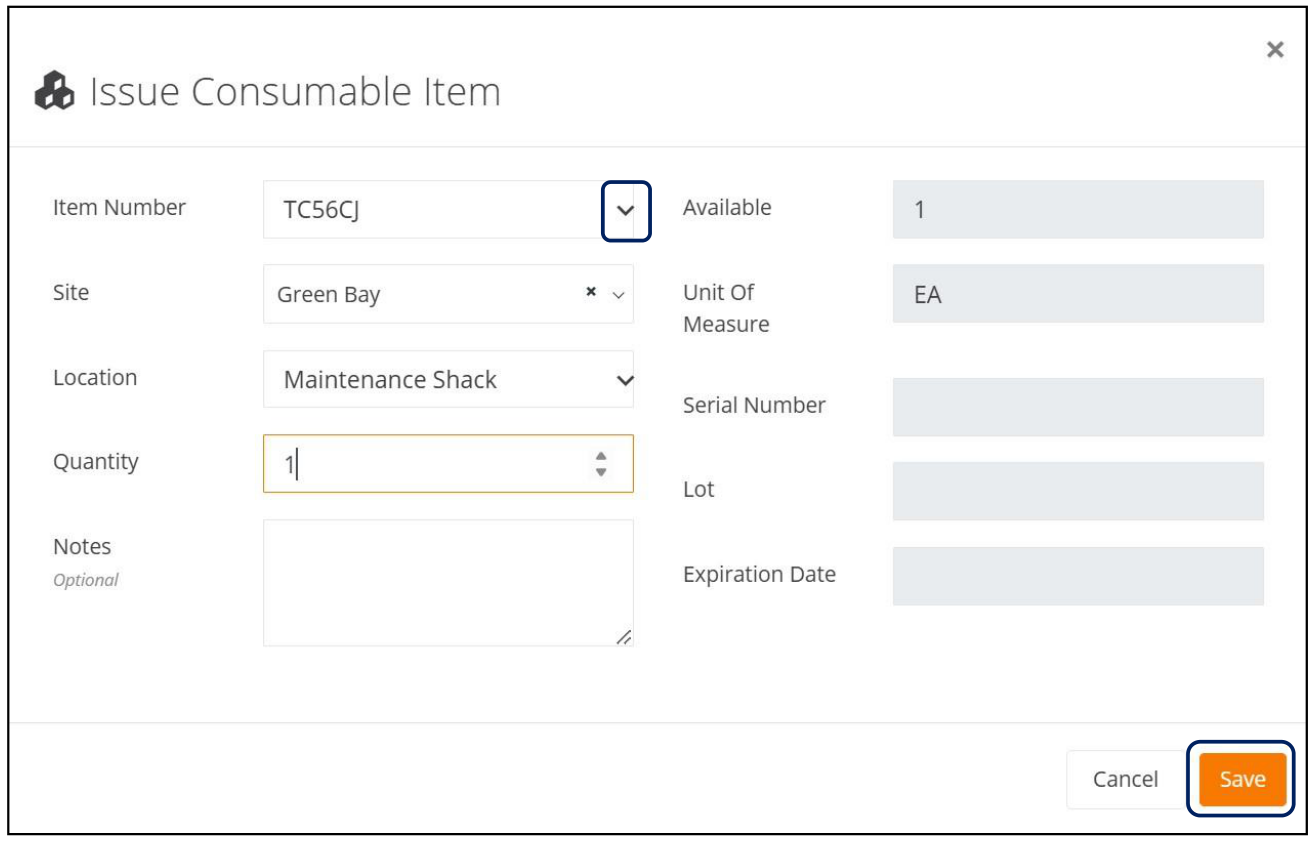
As a Consumable Inventory User, the ability to select an Item to Issue from Available Inventory can now be performed from the Check Out page by clicking on the Issue Consumable Item button.
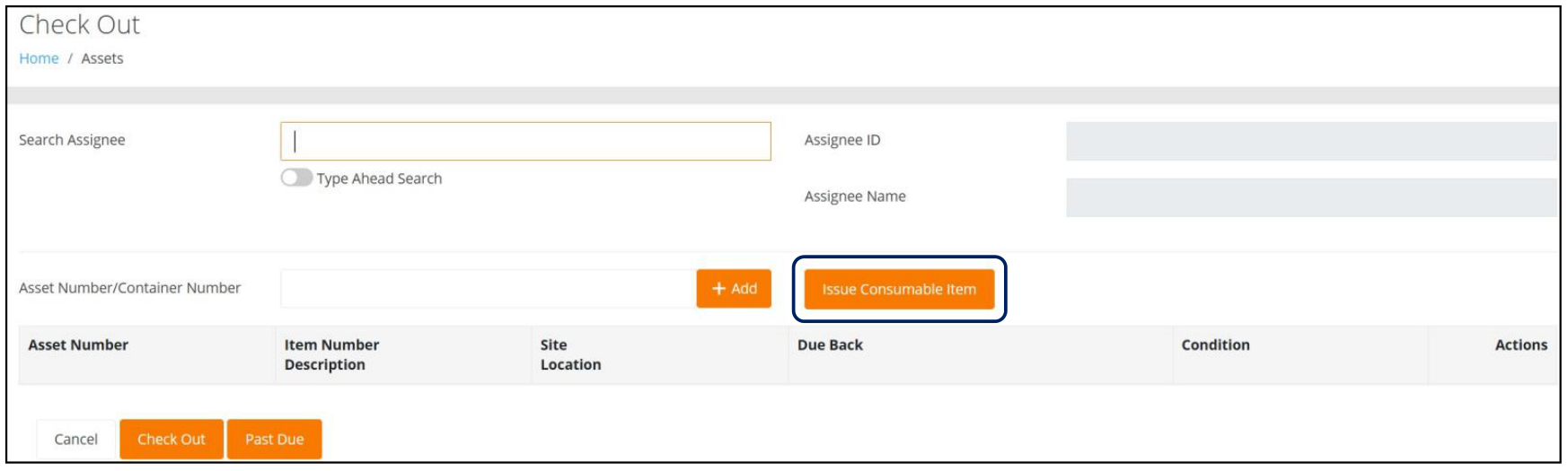
This will launch the Issue Consumable Item popup screen seen below. The User then will select from the Items available in the Item Number dropdown list, which is limited to the Items found in Inventory for the Sites that the User has access to. Upon clicking the Save button, the Consumable Item Issue will then be seen on the Consumables > Inventory page.
Fixed
- When an Item that uses Expiration Dates is deleted from the Add or Edit Container page, any preceding Items found in the Container are no longer deleted.
General Platform
Improvements
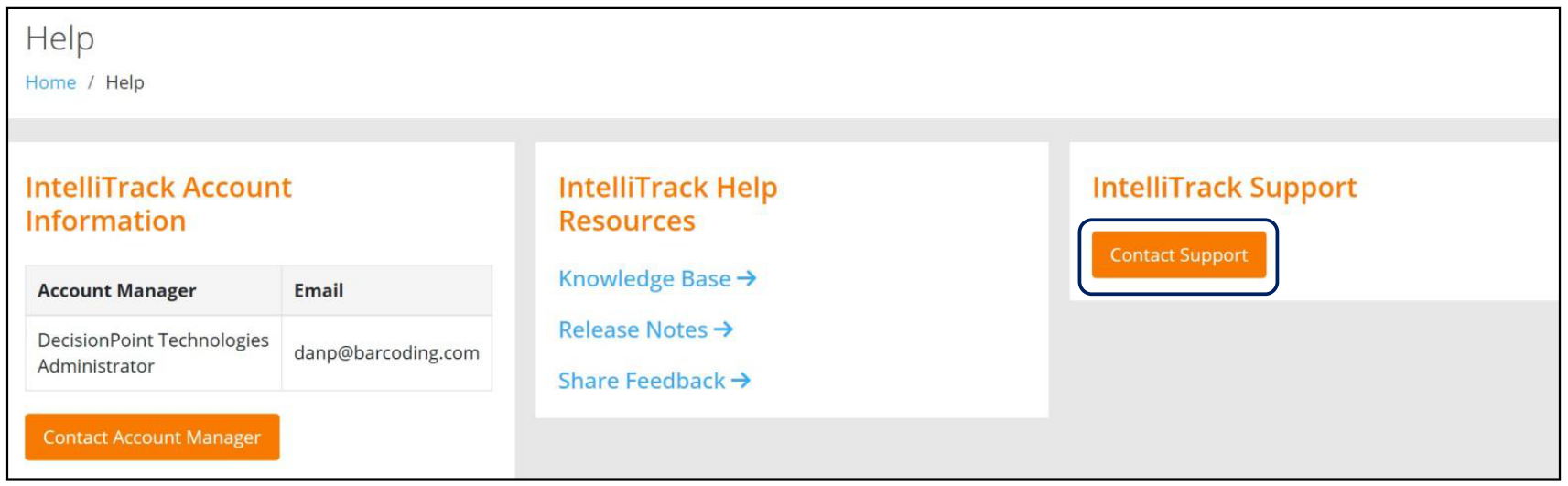
A new Help page has been launched that offers a more streamlined means to obtain Account Information, Help Resources, and Support, as seen in the following screenshot.
Note: This replaces the previous Menu options, Knowledge Base and Submit a Request. Clicking the Contact Support button will launch a new window that contains the Submit a Request form.
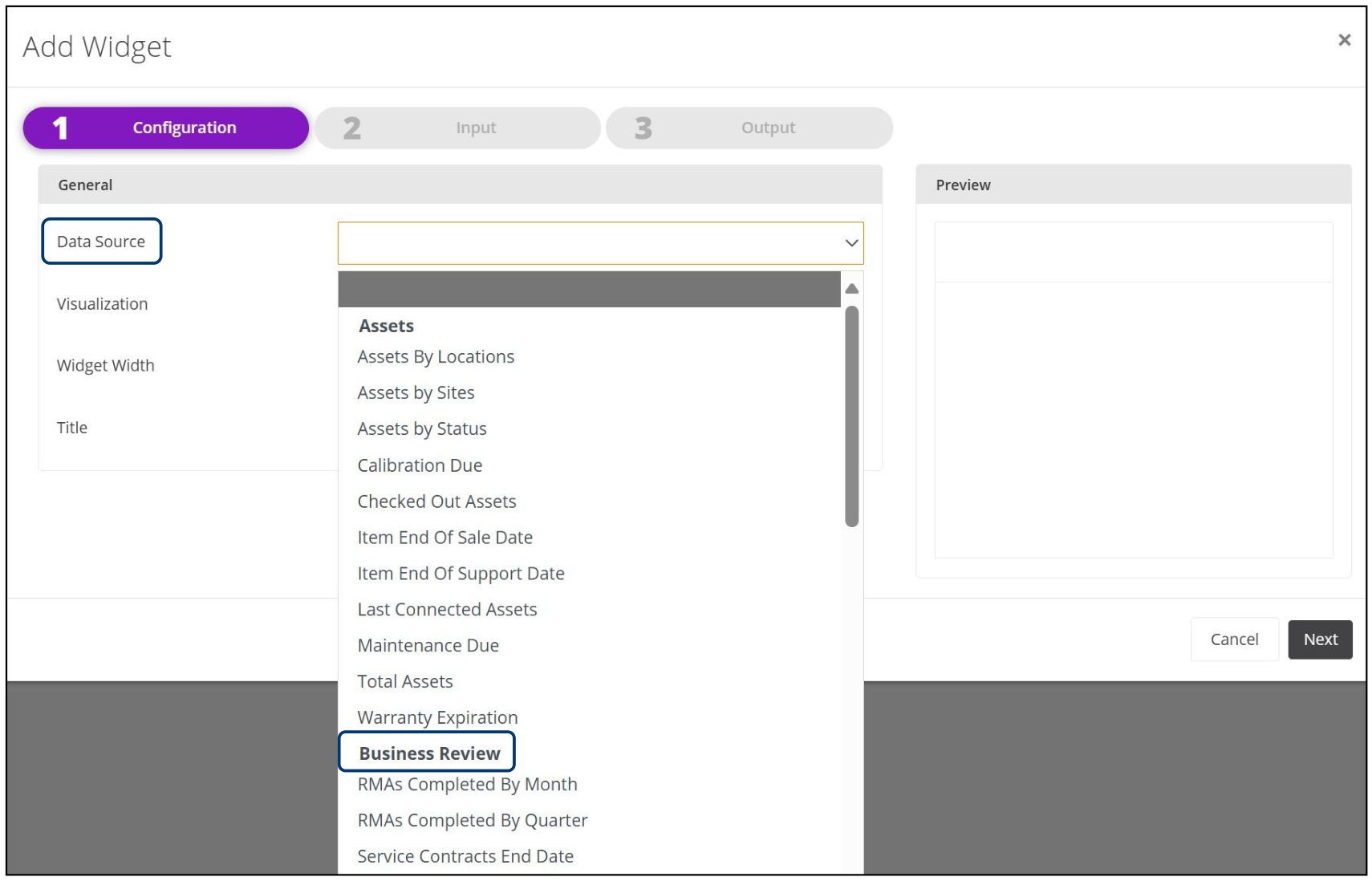
When adding a new Widget from the Insights Menu, the BBR Data Source has been renamed to Business Review.
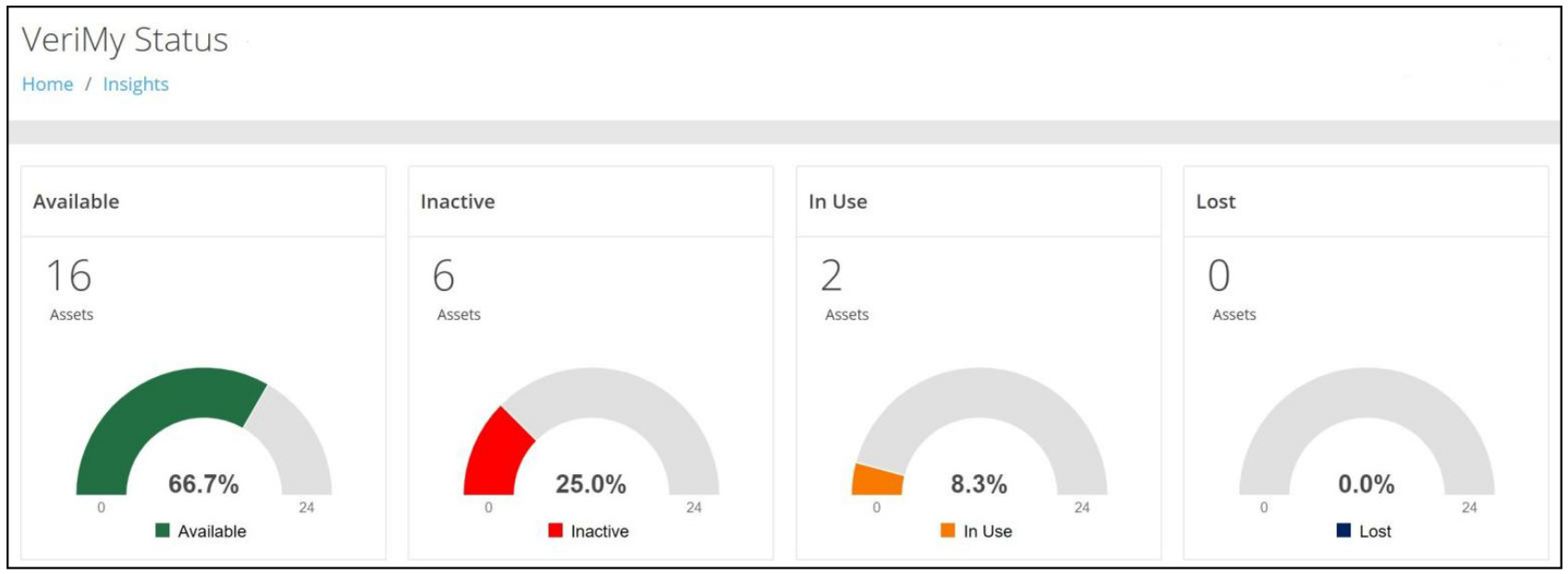
To improve the reporting of VeriMy data for tactical operations, strategic decisions, and device utilization, a new Widget to capture devices where the Status is Lost has been added to the VeriMy Status Dashboard. This change results in the visibility of four "gauges" as follows:
- Available
- Inactive
- In Use
- Lost
Improvements have been made when Adding Filters, most notably on the Insights and Change Tenant pages.
Improvements have been made when creating new Roles within a Tenant.
When a User attempts to upload a file to an Item in a file type that is not supported, an informational message that the file type is not allowed is now displayed.
- Note: Supported types are: .bmp, .gif, .jpeg, .jpg, and .png.
When a Tenant has an excessive volume of Assets, a Search for a Serial Number from the Assets page may result in "No matching records found", which is caused by a "time out". A newly implemented message will now be displayed so that the User understands why the Search failed.
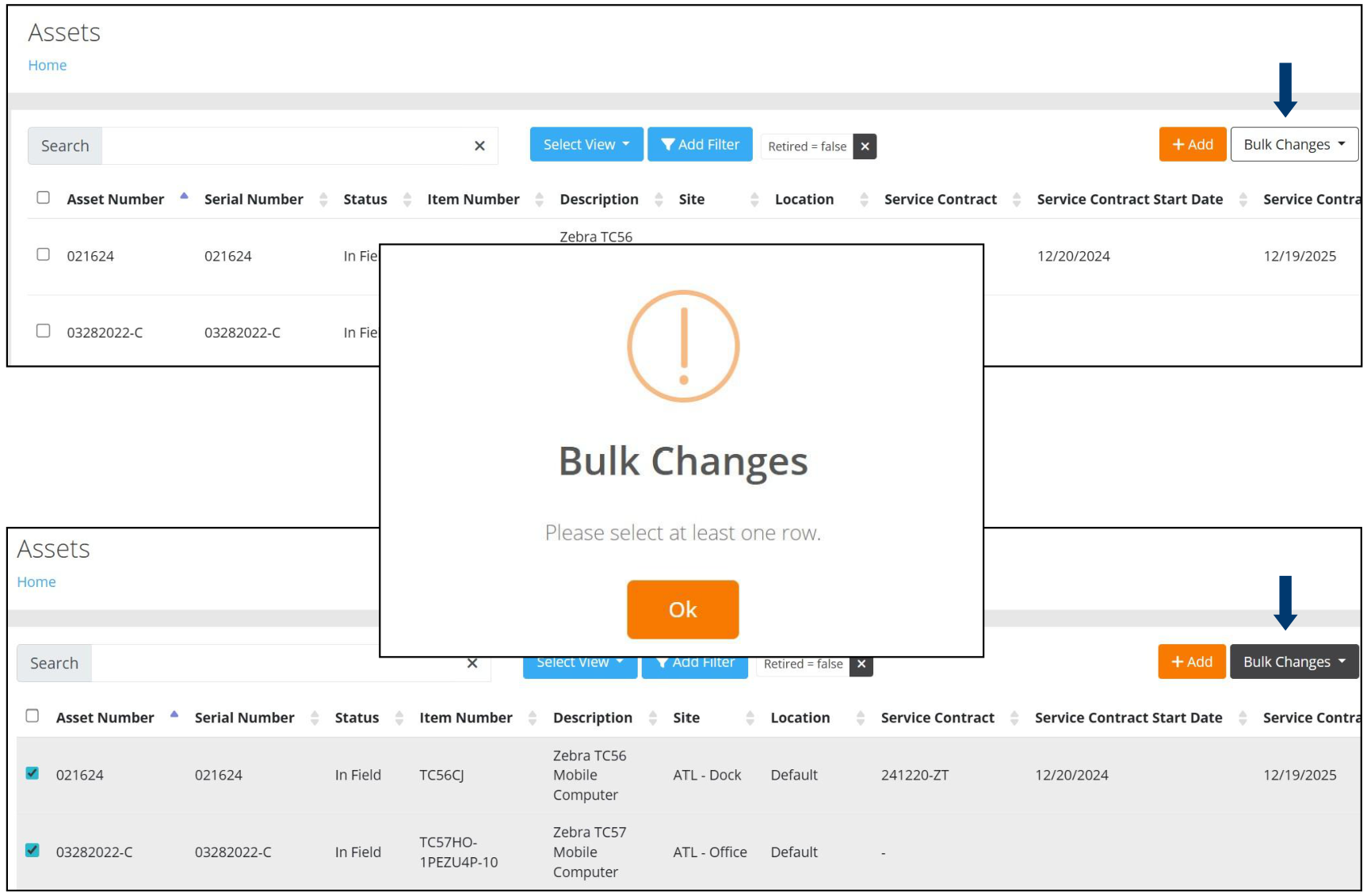
The Bulk Changes feature found on the Assets page has been enhanced to provide the User with improved and more concise options, as follows:
- The Bulk Changes button is not "activated" until at least one row is checked. If the User fails to check at least one row, an alert is displayed, as shown below.
- Upon checking at least one row, the Bulk Changes button becomes "active" and changes from white to dark grey.
Fixed
- The Bulk Changes - Enable VeriMy function now responds and processes the change upon clicking the Apply button.
- The Rows Selected for a Bulk Change operation on the Inventory, Item, Assignees, and Service Contract pages are no longer cleared when the User navigates to another page or expands the "records per page".
- The Page Tab for a Bulk Job now properly displays the Page's Title.
- A device that is Zero-Touch enabled, now properly unclaims a device when it is received at the Repair Depot.
- On the Item History page, two spinning indicators no longer appear when the User increases the number of Records Per Page or navigates from Page to Page using the "Go To" page links.
- The Checked Out Assets Dashboard now properly displays the number of Assets Available.
- An Assignee is now validated when using the Type Ahead Search at the Check In By Assignee page for Assignees that have an Assignee ID but not an Assignee Name.
- An Assignee that is identified as a "Check Out" Assignee and has an Assignee ID, but does not have an Assignee Name, can now be selected for a Check Out transaction.
- Assets that have a "Disabled" Location no longer pose a conflict on APIs that perform a Location lookup.
- An export of Assets with UDF "Date" fields no longer rolls the "Date" field back by one day.
- Field selections can now be removed from lists that are Type Ahead and/or Dropdown by utilizing either a blank option or a clear button.
- An export of the Service Contract Start and End Dates from the Assets page no longer applies UTC time.
- When Editing an Item, an attempt to add a Unit of Measure with a duplicate "Each Count" value now generates a Validation Message.
IT Assets Bundle
New Features
A Reference Number field has been added to the RMA Packing Slip attachment.
Users can now identify if Configuration is needed when creating a New Hardware Request.
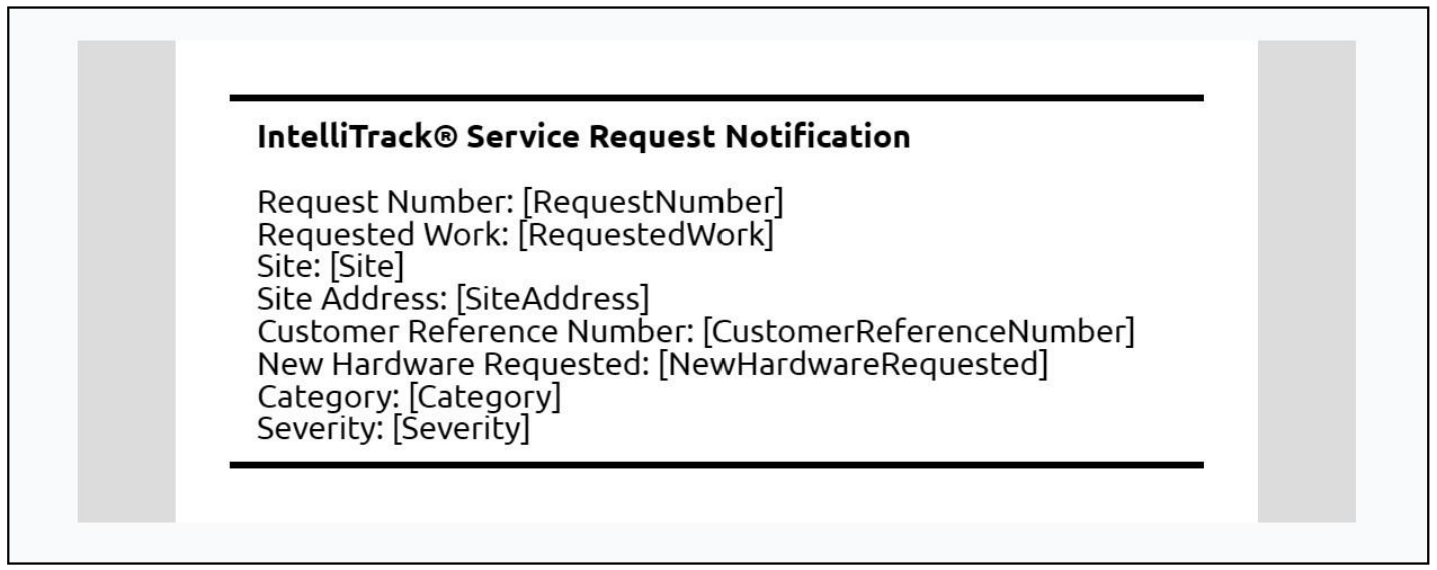
An Email Template, as seen in the screenshot below, is now generated upon the creation of a Service Request. It includes the following fields:
- Request Number
- Requested Work
- Site
- Site Address
- Customer Reference #
- List of New Hardware Requested
- Item Number
- Manufacturer
- Quantity
- Notes
- Category
- Severity
Improvements
- The SOTI Device ID is now properly cleared when an RMA'd device arrives at the Repair Depot. When the device has been repaired and re-enrolled into SOTI, the new Device ID will be captured in IntelliTrack when the nightly "sync" occurs.
Fixed
- The Assets Only in SOTI report no longer displays assets that have a Status of Retired.
VeriMy
- Middleware API Endpoints have been updated. This will resolve issues for customers that have whitelisted *.intellitrack.com on their Firewalls but are unable to utilize the application.
- The application has been recompiled for 16KB page sizes on Android devices.
- A configuration setting has been implemented to allow for the application to start on boot up.
Mobile Client
Fixed
- The "RFID Test" Menu Option is now hidden for non-RFID devices, thereby preventing the failure of the Mobile application's response.
Rotational Assets Bundle
Fixed
- The Check Out Date and Time are now properly displayed in the Localized Time Zone of the User.
- On the Check Out Assets page, when the User performs an Assignee selection using the Type Ahead Search option and then presses Enter, the cursor is now properly placed in the Asset Number field without submitting the Check Out.
- The "Yes" button on the Asset Already Checked Out modal is now responsive.
Fixed Asset Bundle
Fixed
- Closing a Cycle Count that contains a large amount of counted assets no longer times out.
- On the Depreciation Classes page, when the User selects ALL classes, the depreciation is now calculated.
Consumable Inventory Bundle
New Features
- Administrators can now monitor Inventory Adjustment Transactions. This allows them to identify potential physical or internal issues that can result from inventory adjustments. This is achieved through the Inventory Adjustment Email Notification, which contains the following information:
- Item Number
- Description
- Site
- Adjusted From On Hand Quantity
- Adjusted To On Hand Quantity
Improvements
- A User can no longer perform an Edit of an Order that has been Closed. It is available in Read-Only Mode.
- On the Management > Items page, the Add to Inventory Option, previously displayed by clicking on the three dots found under the Actions column, is no longer available for Items that have been Disabled. When the Item is Enabled, the option will then become available.
Fixed
- If an Order Number already exists that contains User Defined Fields, and the user performs an Issue, Receipt, or Return, the values contained in the UDF area of the page no longer disappear and any values that were entered are not lost when Save is pressed.
- An Item can now be successfully added when performing a Picking Order and/or a Receiving Order when Auto-Line Numbering is Disabled.
- When Auto-Line Numbering is Disabled, an import for a Picking Order and a Receiving Order no longer fails when the Line Number field contains a string value with alphanumeric and/or special characters.
- The Carrier and Carrier Method are now properly saved when adding a new Picking Order.
- The UTC Offset is no longer applied for an Order User Defined Field on the Orders page or on the .csv export file.
- If the "Auto-Update Inventory Quantity Setting" is Disabled for a Site, a Move Transaction in full to another location cannot be performed for an Item in Inventory that has an On Hand Quantity and an Inventory Quantity.
- The Receiving Order now validates for an Item that is not found. Previously, the User was able to add the Item to the order.