Appearance
IntelliTrack Q2 2025 Release Notes
Released: July 15, 2025
Quarterly release introducing three major features - Insights KPI enhancements, the MyCatalog product catalog, and VeriMy enhancements - along with new features, improvements, and fixes for the general platform, the Mobile Client, and the IT Assets, Rotational Assets, Fixed Assets, Consumable Inventory, and Mailroom bundles.
Insights
IntelliTrack's Dashboard offerings, available from the Insights page, have been enhanced to include additional Key Performance Indicators (KPIs) within the Consumable Inventory Bundle, as detailed below.
These dynamic KPIs will provide Users with real-time visibility into Stock Levels, Inventory, and Orders, thereby enabling them to support and implement smarter inventory decisions.
- Stock Level: Monitor reorder levels before it's too late.
- Out of Stock
- Low Stock
- Optimal
- Overstocked
- Expired Inventory: See what is nearing expiration and be prepared.
- Expired
- 30 Days or Less
- 31-60 Days
- 61-90 Days
- Over 90 Days
- Inventory By Location: Know where inventory can be found.
- Last Inventory Date: Plan for scheduled inventories.
- Today
- 1-30 Days
- 31-60 Days
- 61-90 Days
- Over 90 Days
- Not Inventoried
- Open Picking Orders: Stay on top of Picking orders and Due date.
- Picking Orders Due:
- Past Due
- 3 Days or Less
- 4-7 Days
- Over 7 Days
- Open Receiving Orders: Stay on top of Receiving orders and Due dates.
- Receiving Orders Due:
- Past Due
- 3 Days or Less
- 4-7 Days
- Over 7 Days
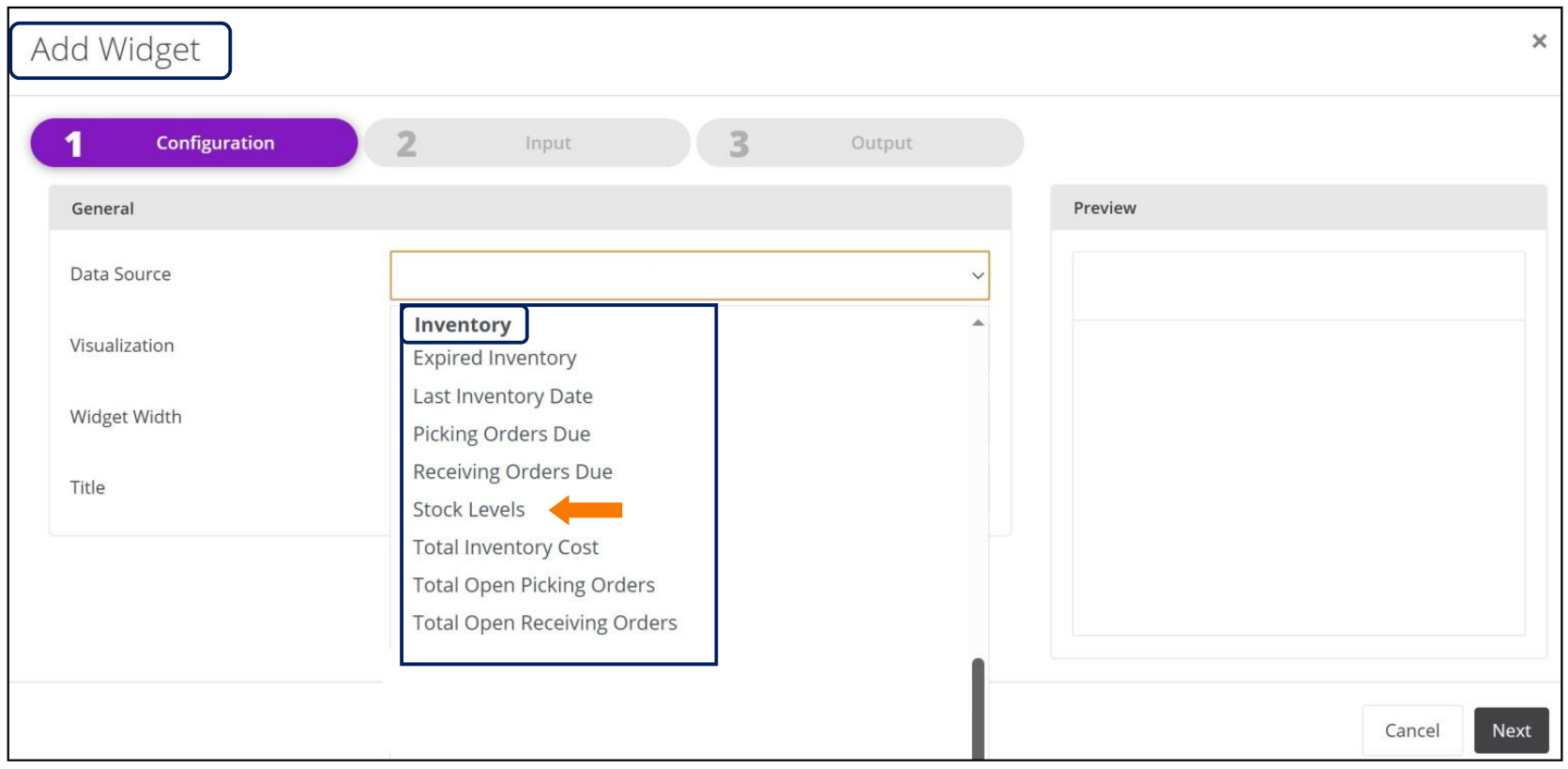
The new KPI options are available in the Data Source dropdown list when the User adds a new Widget, as shown by the screenshot below.
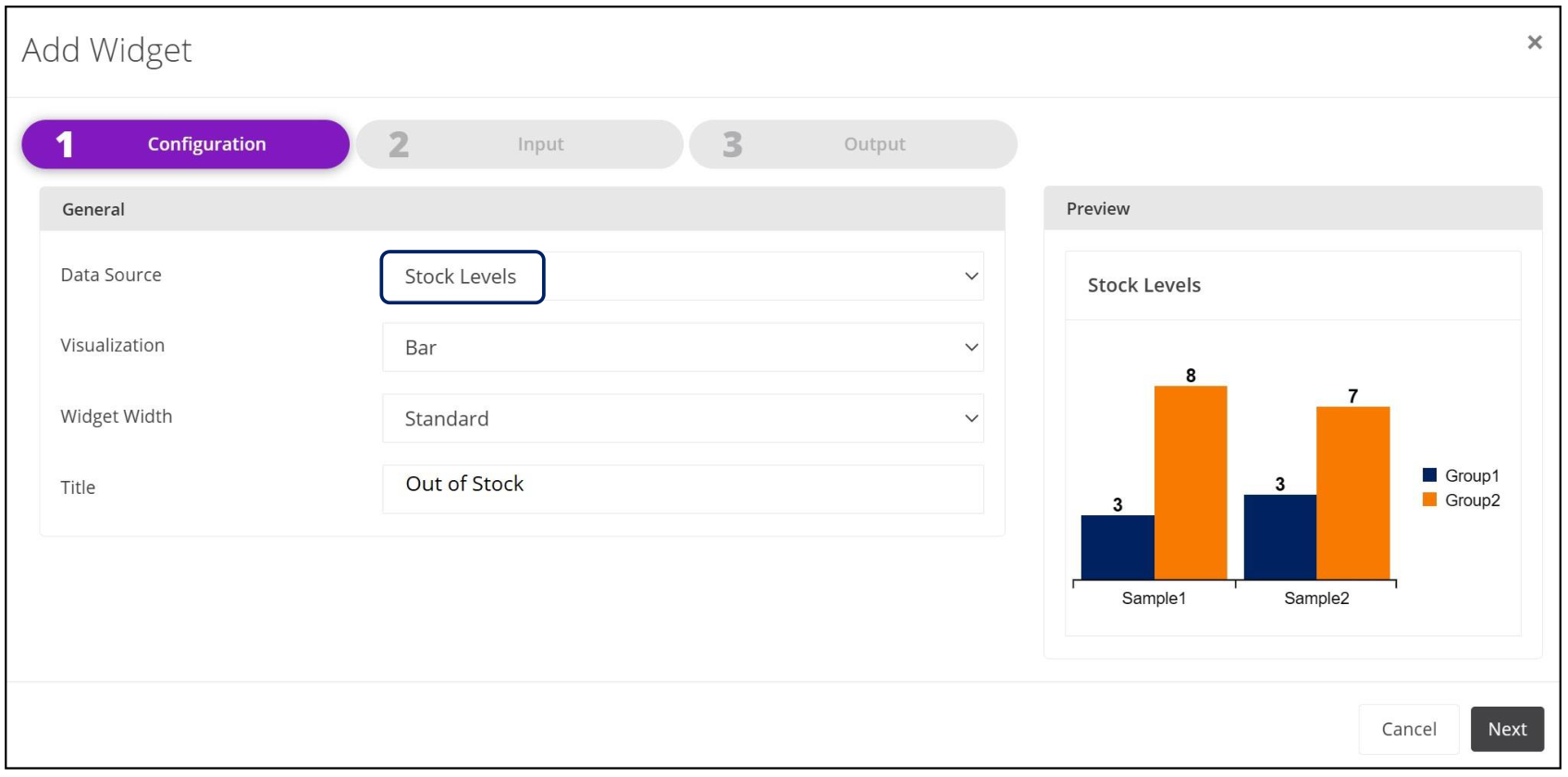
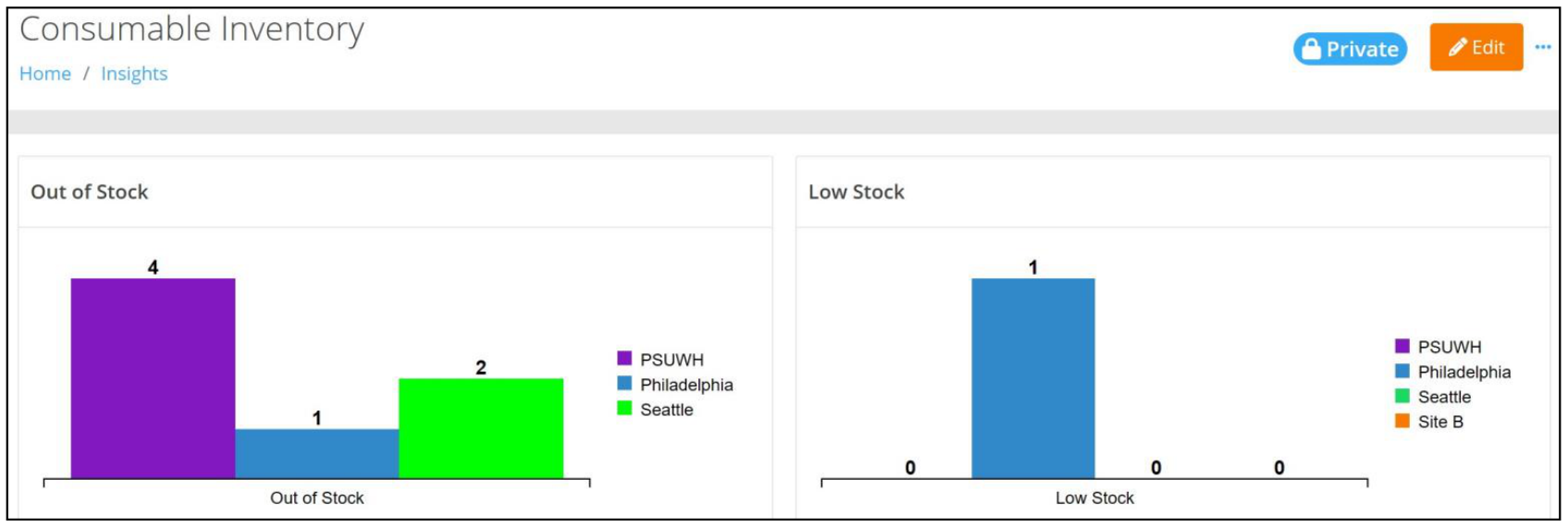
The Consumable Inventory Widget that follows is the result of utilizing the Stock Levels KPI to identify Inventory that is Out of Stock or has Low Stock.
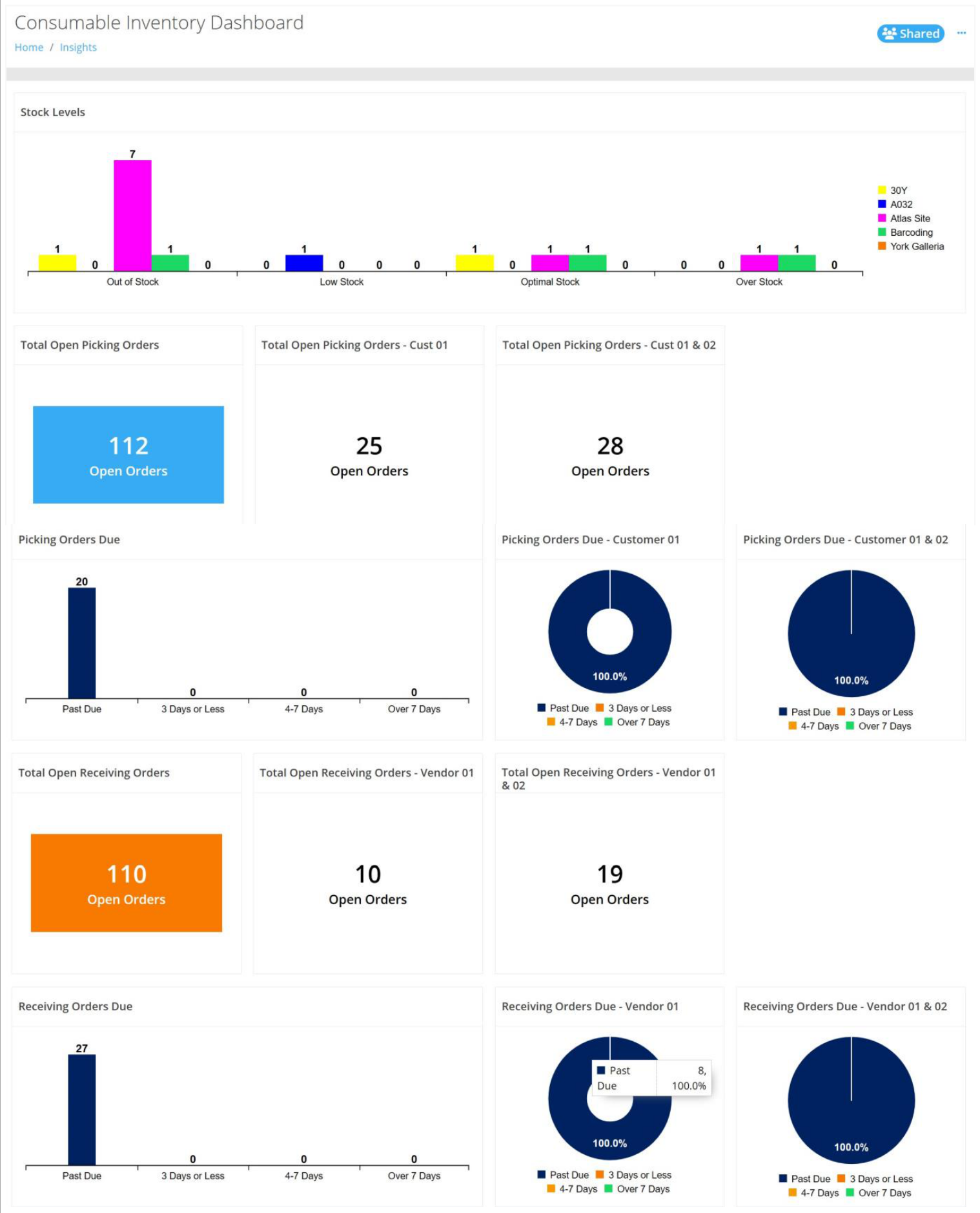
Thanks to the newly implemented KPIs, the opportunity to create a robust Consumable Inventory Dashboard is now possible, as seen below:
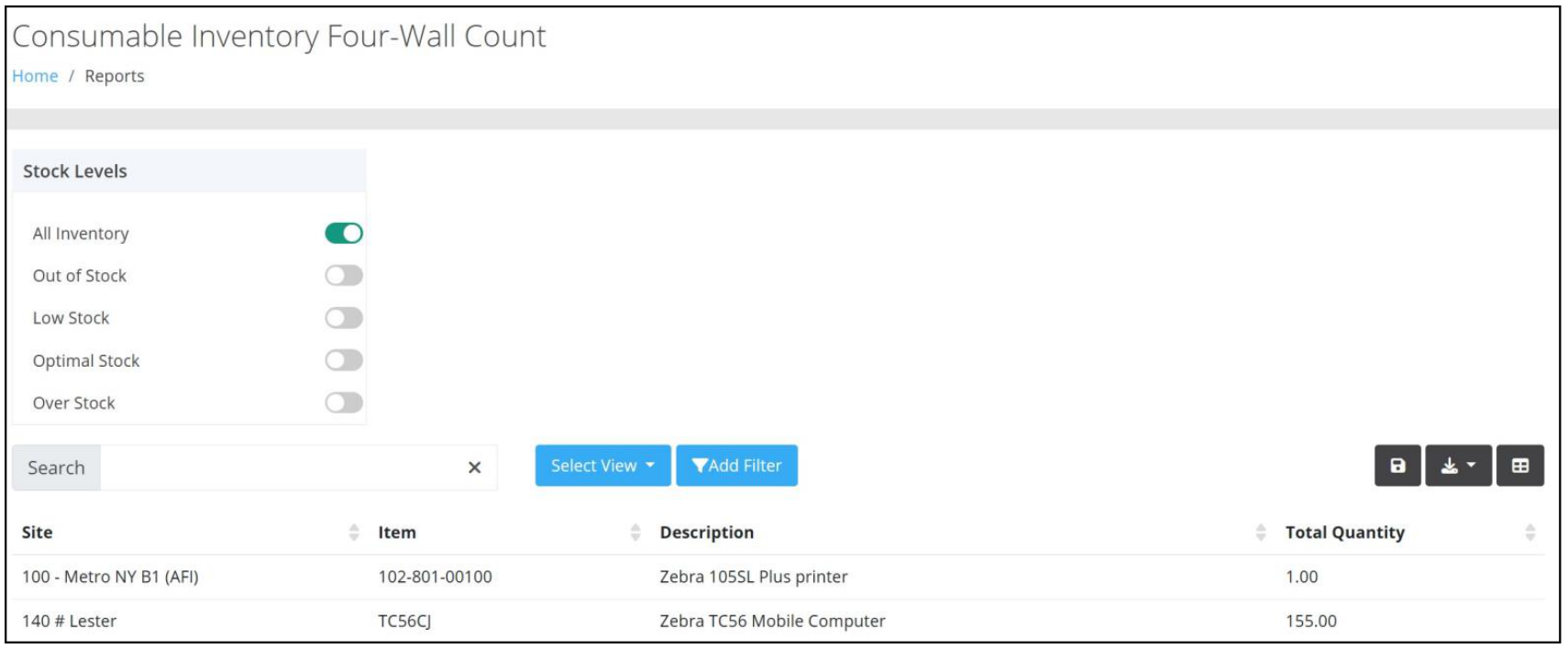
In addition to enhanced KPIs, a new Consumable Four-Wall Count Report can be found on the Insights page. This report enables Users to view the Total Sum Quantity for Inventory across all Units of Measure by Site and by Item.
Product Catalog
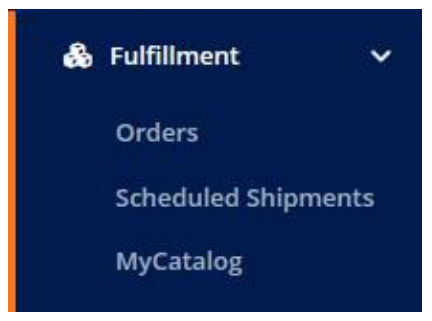
DecisionPoint Technologies is excited to announce a new addition to the Fulfillment Menu. "MyCatalog" will streamline how Users of IntelliTrack reorder items.
With one-click access to https://mycatalog.intellitrack.com, Users will enjoy the ease of ordering without launching a separate website.
And, thanks to the convenience of Single Sign On (SSO), Users simply log into IntelliTrack - no additional login is needed.
Note: This feature is added to a Tenant's bundle and is permission based depending on the User's Role.
VeriMy Enhancements
Improvements
- When a device with VeriMy Enabled ships from the Repair Depot, it now Disables and Re-enables the application.
- SOTI Startup Behavior has been improved after rebooting the device.
- The About screen now contains an updated Copyright notice.
Fixed
- A User can no longer perform a Check Out with an Incorrect or Non-Existent Assignee Id after a Timeout occurs on the device.
- Users are now able to resume the Check Out process after a Timeout occurs on the device.
- The application no longer allows a Check Out operation when an improper space exists in the Assignee Id.
- The Datalogic Memor 10 and Memor 11 devices now perform as expected after Check Out.
- The application now properly responds:
- When a Timeout appears.
- Following a Startup on Zebra Android 14 devices.
General Platform
New Features
- A User Defined Field that is in use cannot be changed.
Improvements
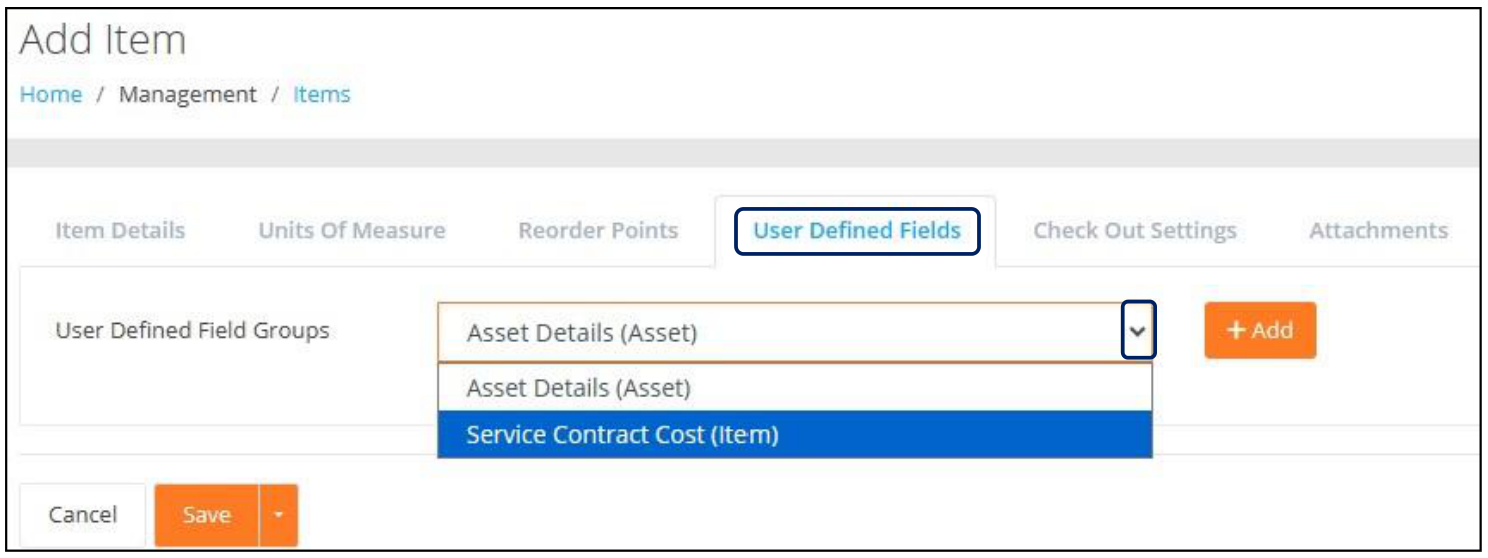
User Defined Field Groups are now categorized as an Item Group or an Asset Group in the User Defined Field Groups dropdown list at the Add Item / Edit Item > User Defined Fields Tab, as seen in the screenshot below:
On the Assets page, a new Manage Column option for Retired is available. When applied, the column is displayed and is also included in the .csv Export file.
An "Optional" Comments field has been incorporated into the Change Location and Bulk Change Location dialog. If a Comment is entered, it is displayed in the Asset History record.
- Note: This improvement does not include the Consumable Inventory or Mailroom bundles.
On the Edit Widget page, a notification is displayed after clicking the Save button if a required selection has not been entered.
At the Add Widget Wizard and the Edit Widget Wizard > Output Tab, a Sort Order has been applied to the Data View Drop-Down list options.
A Checkout Assignee can no longer be Disabled when they have Checked Out Assets.
Additional features for images are now available to the User on the Add / Edit Item pages, to include:
- Ability to remove/clear a selected image file.
- Restrictions for adding an image whose resolution exceeds 1920 x 1080 pixels.
Fixed
When an Asset Import is being performed, a blank line in the Import file is now skipped over instead of recorded as a "bad" line in the Import Results email.
An Invalid Date is no longer displayed when a UDF field has a data type of Date and a Value that contains a Time component.
A UDF Group that does not contain any fields is no longer available in the User Defined Fields Group dropdown list.
Pressing the "x" to the far right of the User Defined Field control for the Date and Date-Time field now clears the selection.
The Edit Container Quantity field is now displayed in a consistent format.
At the Add Cycle Count page, the Location popup is no longer accessible if a Site has not been selected.
The Past Due Assets Dashboard now correctly displays the correct Due Back Date / Time.
The Dashboard Title for "Barcoding Account Overview" has been updated to "DPT Account Overview".
Currency values are now properly displayed on the Asset History tab for transactions that involve currency updates for Purchase Cost.
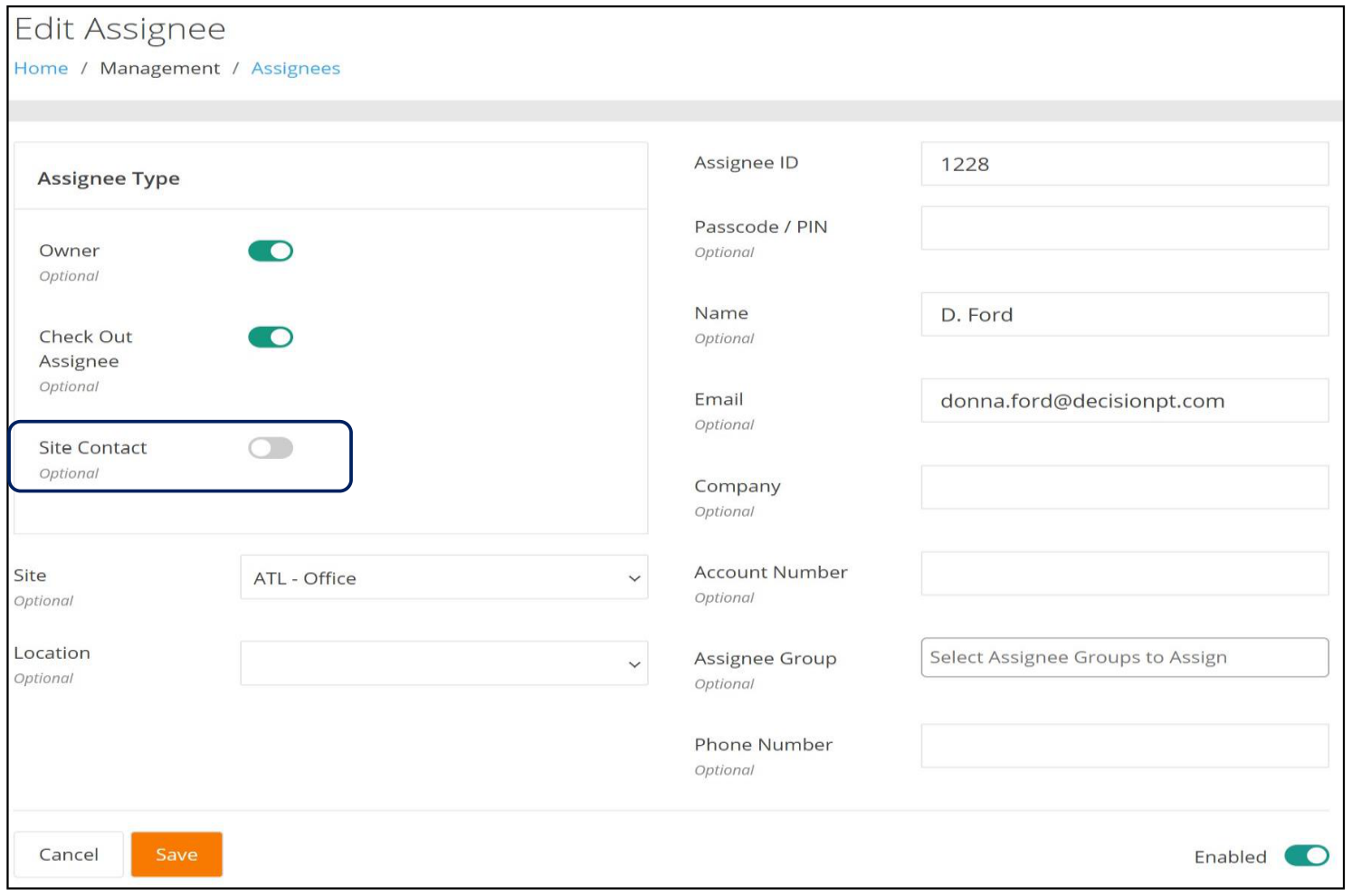
Assignee Administrators are now able to Clear a Site from an Assignee on the Edit Assignee page.
Note: This functionality requires Disabling the Site Contact toggle, as seen below:
Mobile Client
Improvements
- The About screen now contains an updated Copyright notice.
Fixed
- The application now successfully responds after a brief period of inactivity.
- Zebra devices that do not have RFID Readers and/or have been upgraded to Android 14 no longer crash at startup.
- A Move Transaction for an Item that uses Serial Numbers is no longer allowed when the On-Hand Quantity is zero.
IT Assets Bundle
Service Requests
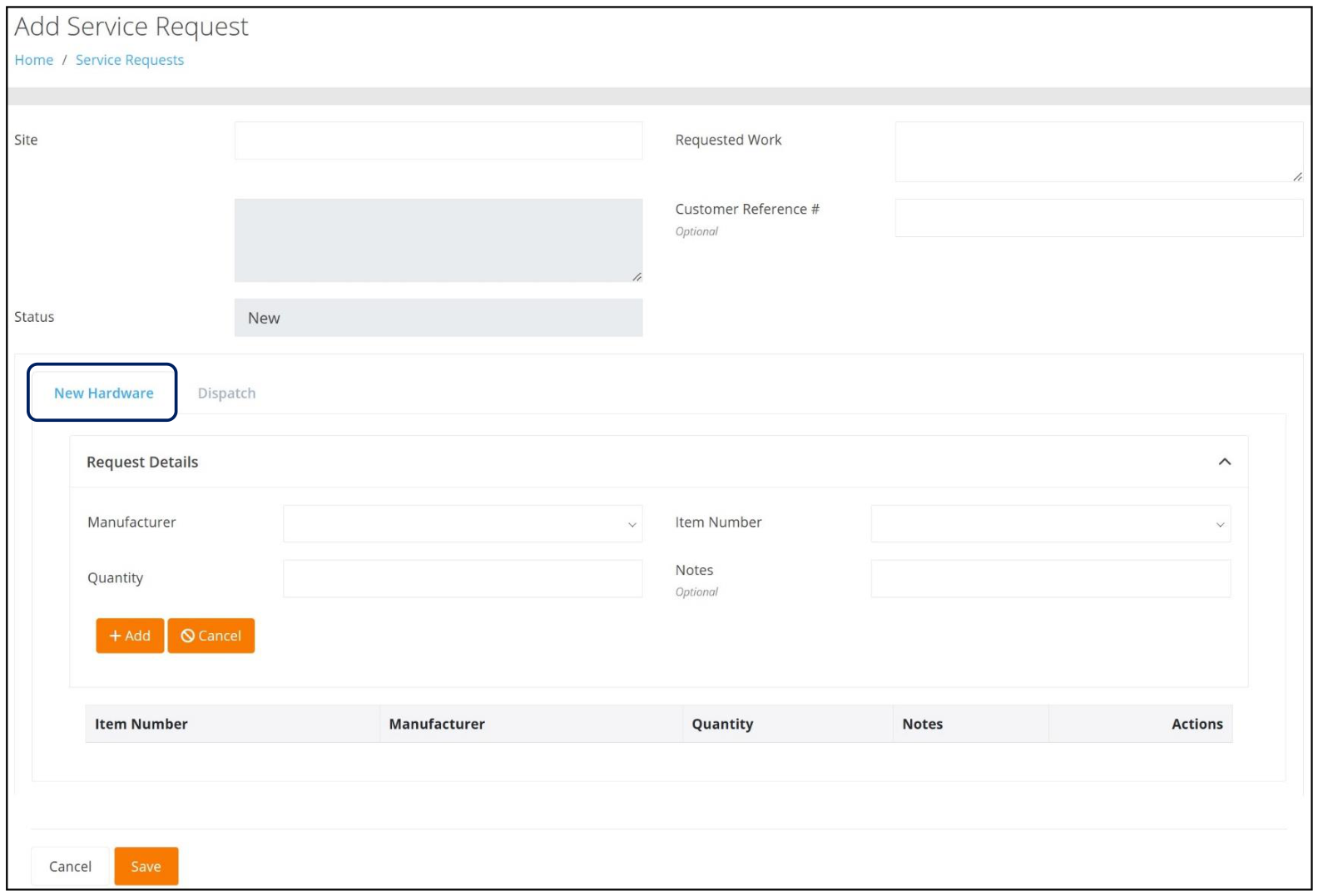
This new feature provides the User with a means to request that a new Hardware Device and any associated accessories be sent to their Site. This functionality allows for the addition of more than one asset, i.e. scanner, keyboard, etc. to the Service Request as well as any applicable Notes that may be beneficial.
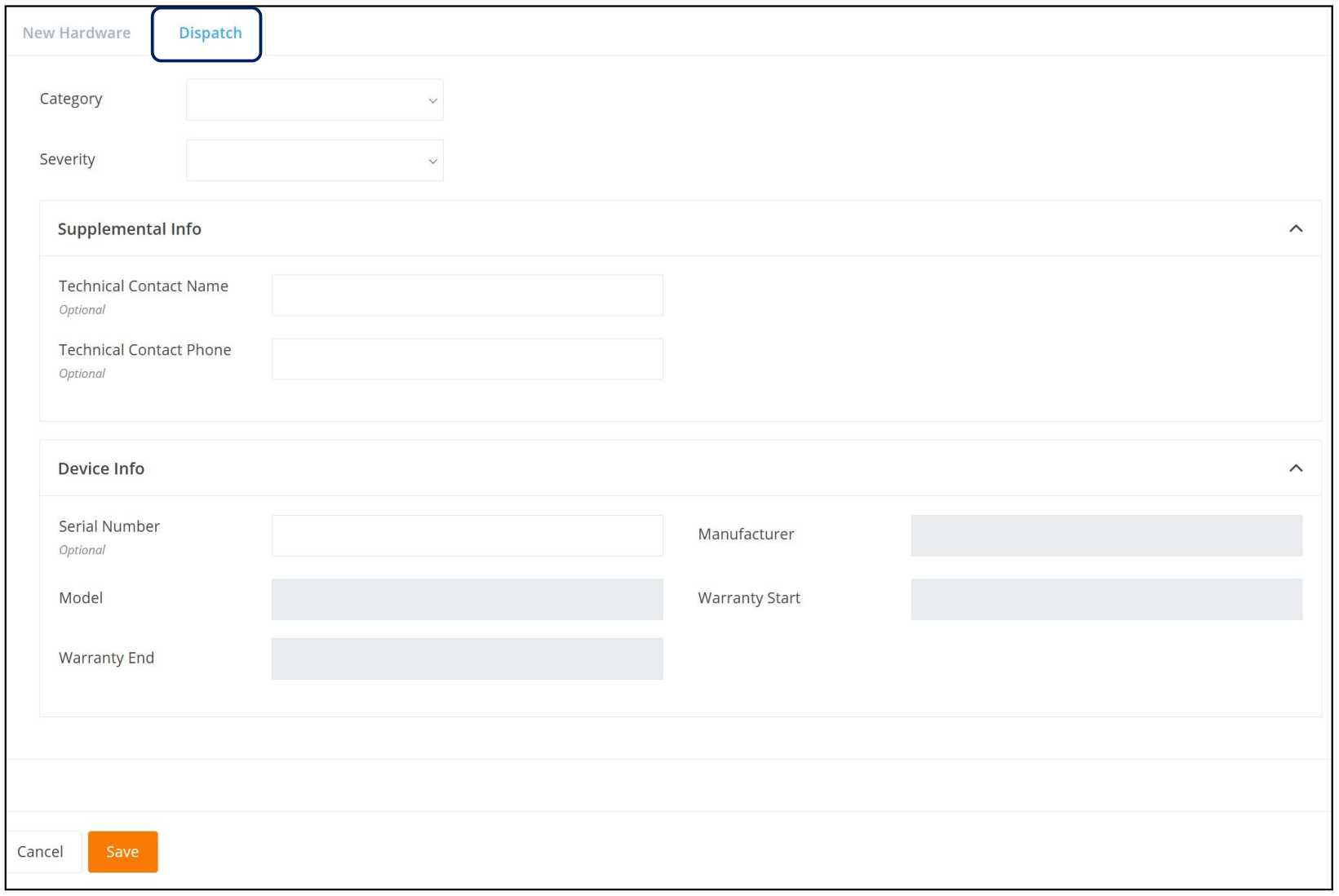
It also allows the User to generate a Dispatch request, which provides the means to specify Requested Work at a given Site by identifying a Category for the service as well as the Severity level of the request. Supplemental information such as Contact details and Device details can also be included.
Viewing Service Requests
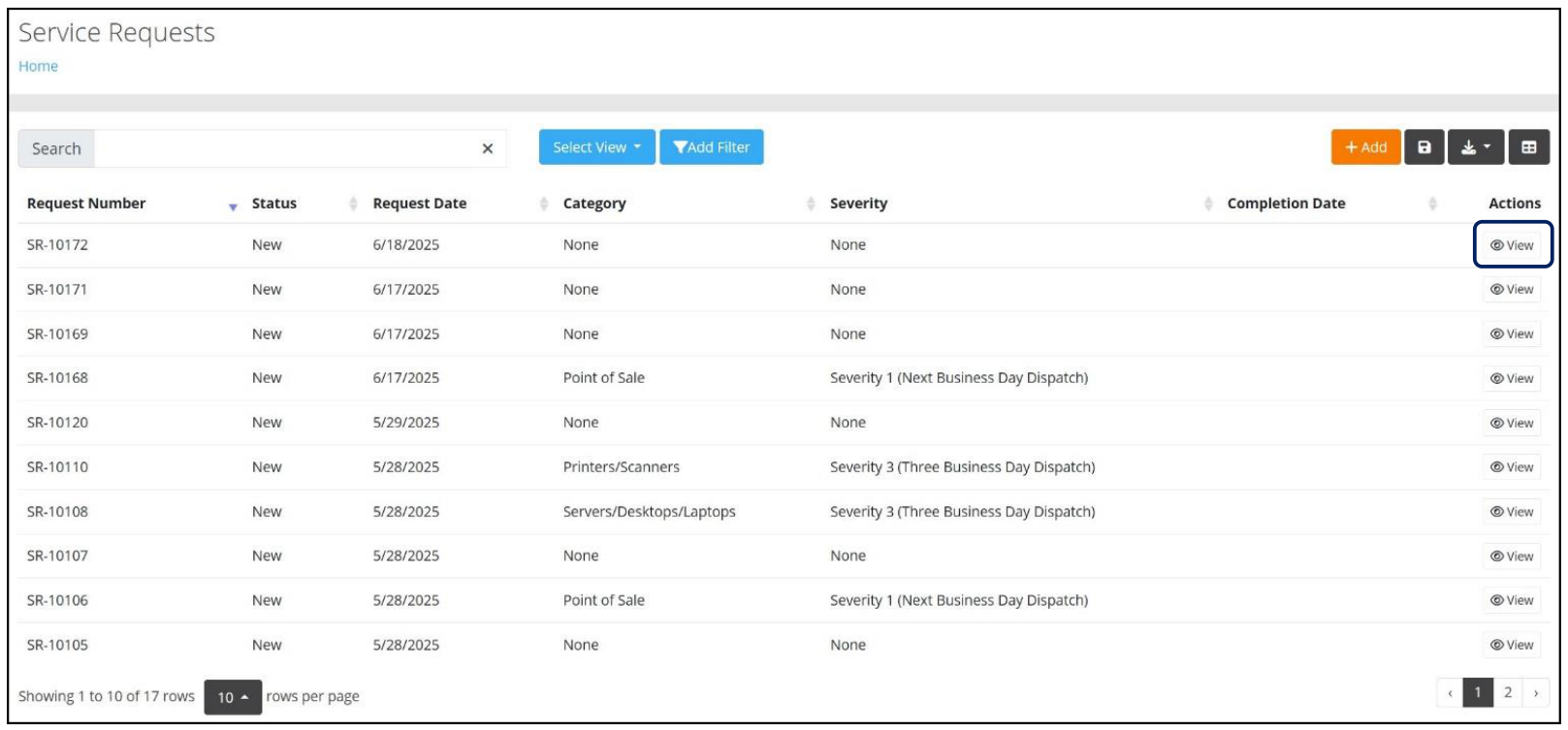
After selecting Service Requests from the Main Menu, the Service Requests page, which contains a list of all Service Requests for the Tenant, is displayed, as seen below. Additional functionality on this page includes the ability to:
- Search for a Service Request.
- Add or Remove Columns.
- Save and Manage Views of the page after choosing preferred columns and/or applying filters.
- Export the data to a .csv file.
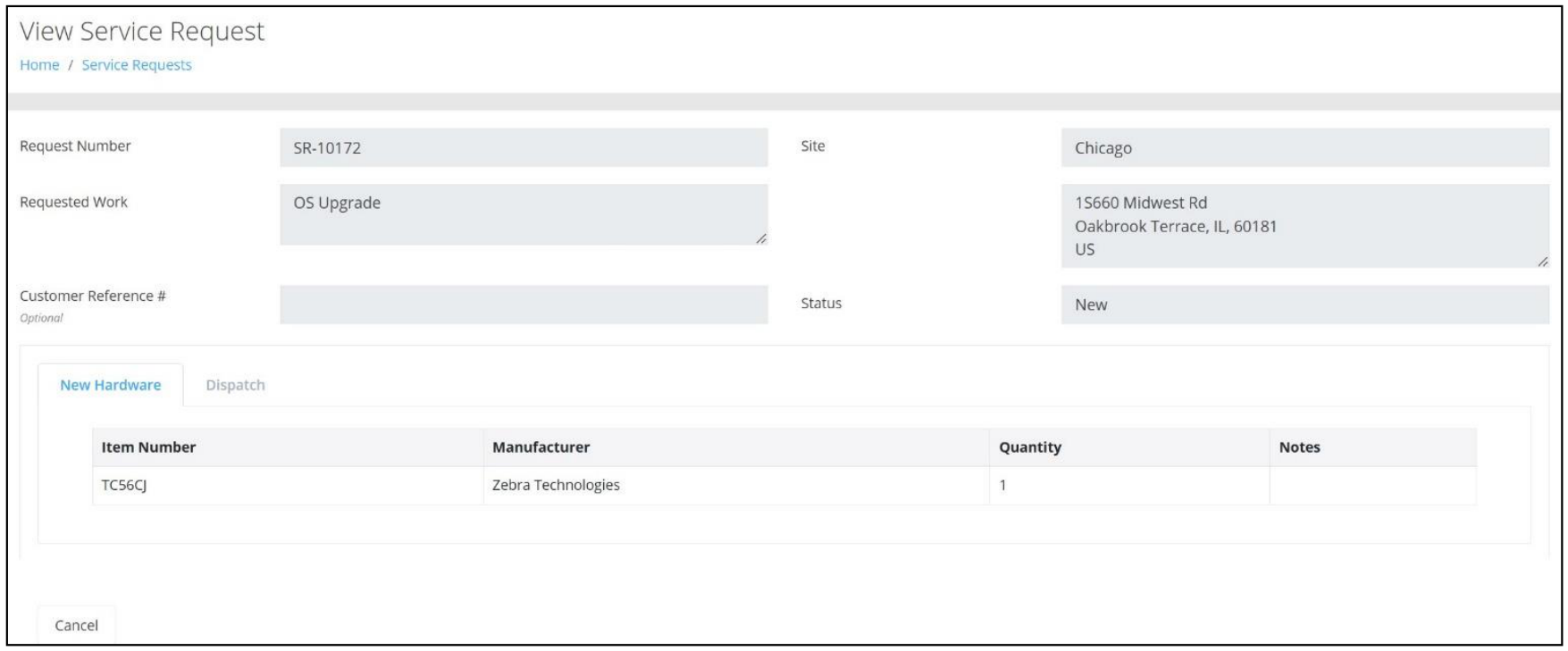
In addition, Users can review a specific Service Request by clicking on View under the Actions column found to the far right.
Adding Service Requests
From the Service Requests page, Users will click on the Add button to create a New Request using the New Hardware tab or Dispatch tab, as seen below.
Note: Only Items that have been identified as available for Service Requests will be seen in the Item Number dropdown list.
New Features
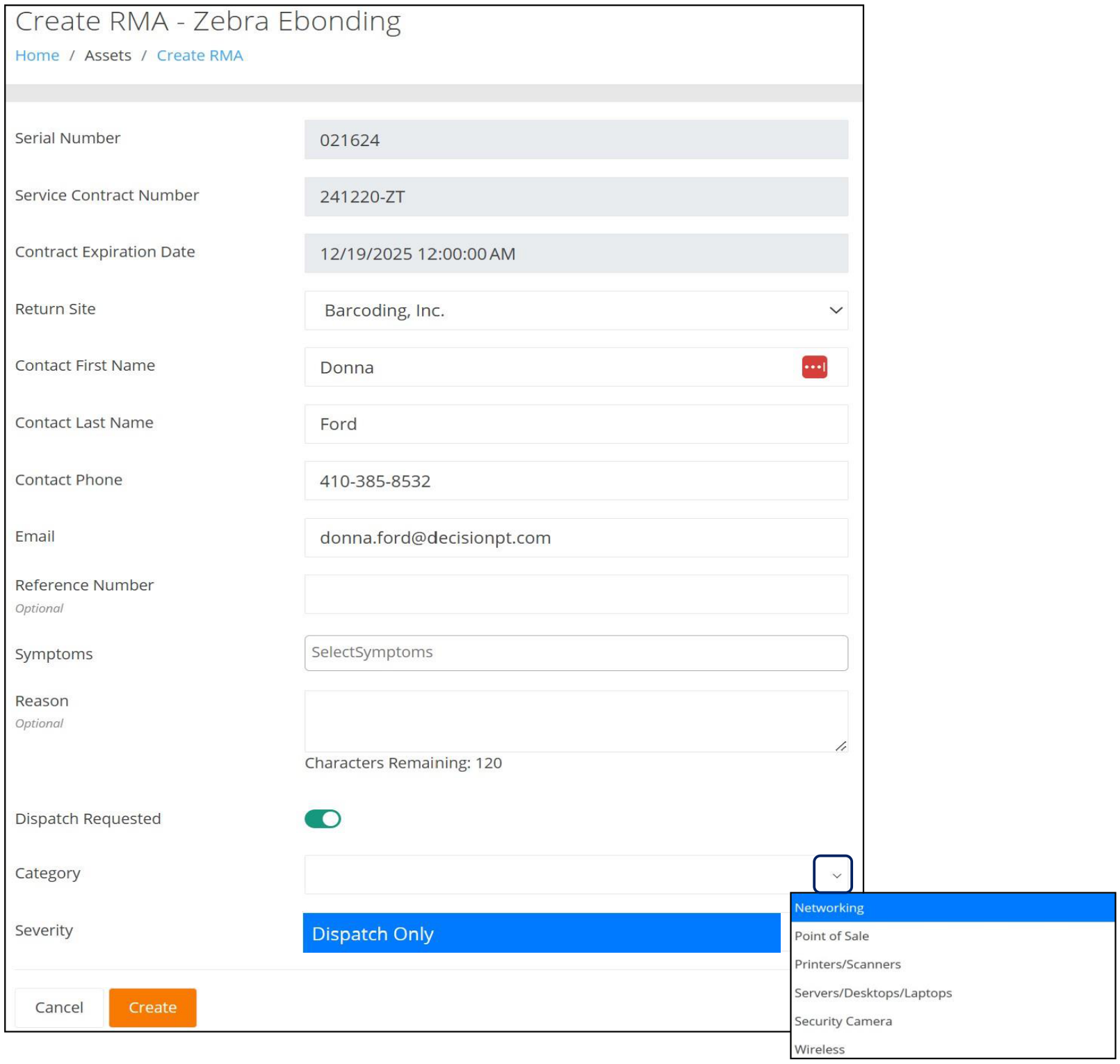
A new "Dispatch Requested" toggle has been incorporated into the Create RMA form, as seen below. When toggled "On", the User can choose a Category from the dropdown list as well as select a Severity for the request.
Once the RMA has been created, a new Service Request will be generated that contains a Hardware Request as well as a Dispatch Request. It will be displayed on the Service Request page.
Note: This feature requires the Service Requests bundle as well as a Repair Depot Rule that includes the Service Request Recommended option.
The Carrier's Tracking # for a shipment from the Repair Depot to a DEPOT facility has been incorporated into RMA Summary report.
Improvements
- Datalogic RMAs now utilize the standard IntelliTrack Packing Slip.
- Packing Slips will now contain a "Site Contact" name on the Ship Repaired Items To section only if the Site that the asset is being shipped to contains a designated Site Contact; otherwise, a Contact will not be identified.
- The Create RMA form for DecisionPoint Repair Requests now contains the proper title, "Create RMA - DecisionPoint Technologies".
Fixed
- The RMA Summary Report no longer displays Open RMAs when the status of the RMA is Closed.
- The "IntelliTrack Shipment Notification" email generated when a Ship to Site is performed for a Scheduled Shipment transaction now contains the following information:
- Tracking #
- Shipment Method
- Estimated Date of Arrival
Rotational Assets Bundle
Fixed
- The Return Order Number field at the Check In by Assignee page is present only if the Tenant has the Rotational Assets bundle plus the Consumable Inventory bundle.
Fixed Asset Bundle
Fixed
- The Asset Movement Report now captures location updates if it was performed through a Container Move.
- The Assets Not Inventoried Report now allows the User to Filter Out Retired Assets.
- A User can now add cycle count locations by check box selection at the Add Cycle Count Locations form. This allows the User to quickly add multiple locations to the Cycle Count. In addition, the User can also Search through the Location list by using the Search field.
- The ability to Clone a Cycle Count has been implemented.
Consumable Inventory Bundle
New Features
The ability to generate a Packing List from the Picking and Issues pages is now available.
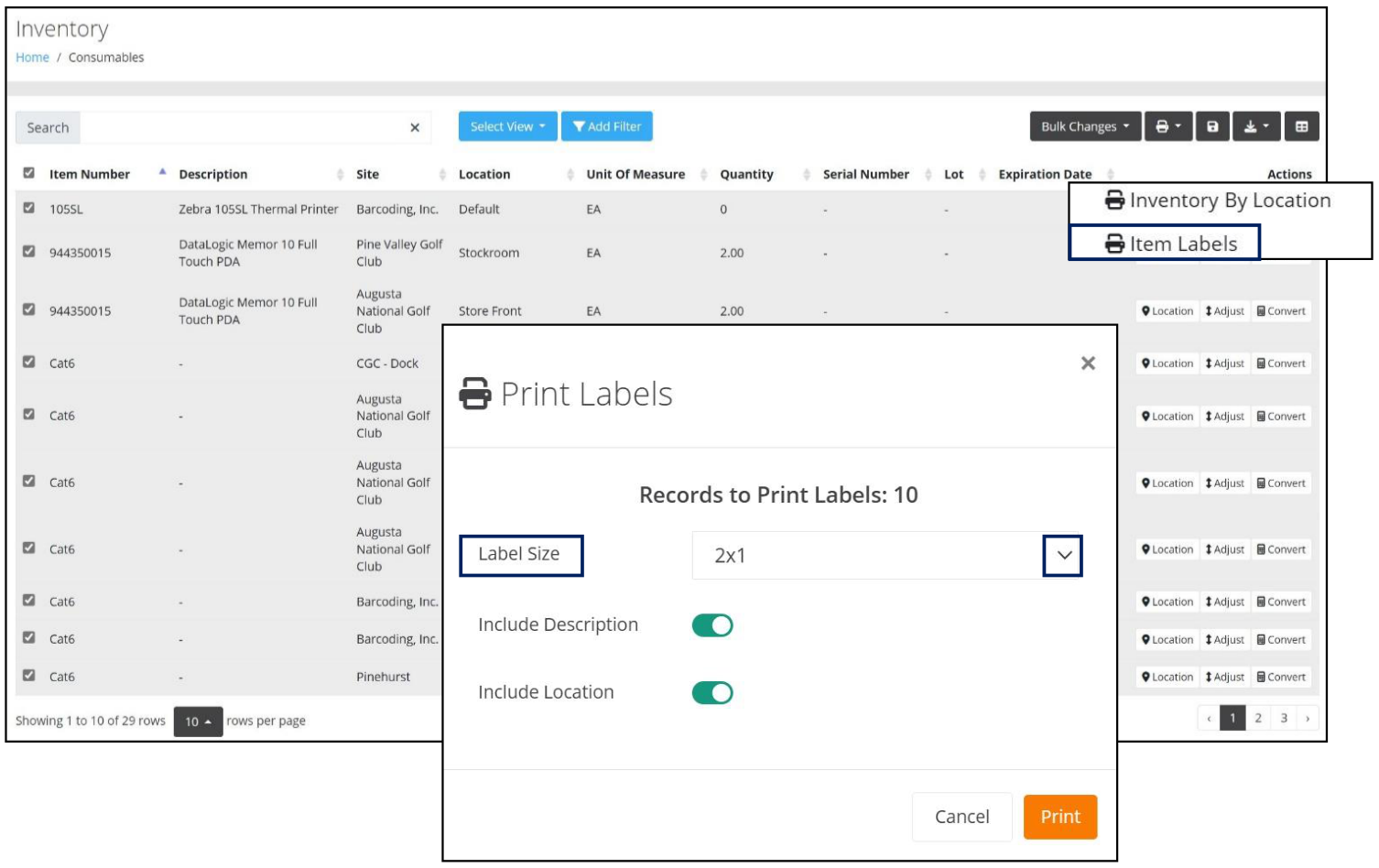
Printing Labels for selected Inventory Items is now available from the Inventory page, as seen below.
The User will select the Label Size from the dropdown list provided and can then elect to include a Description as well as a Location by setting the toggle to On.
Upon pressing the Print button, a Print Preview of the labels will be displayed, which will include the Item Barcode as well as the Description and Location, if enabled.
Improvements
The name of the .csv file is now correct when exporting the Goods Received Note Report and the Packing List Report.
The Goods Received Note Transaction Detail Line has been reformatted to Italics so that it matches the Header.
For Tenants with the Consumable Inventory bundle only:
- The Asset User Defined Fields option is no longer available.
- On the User Defined Field Groups page, the Default (Asset) group is no longer displayed.
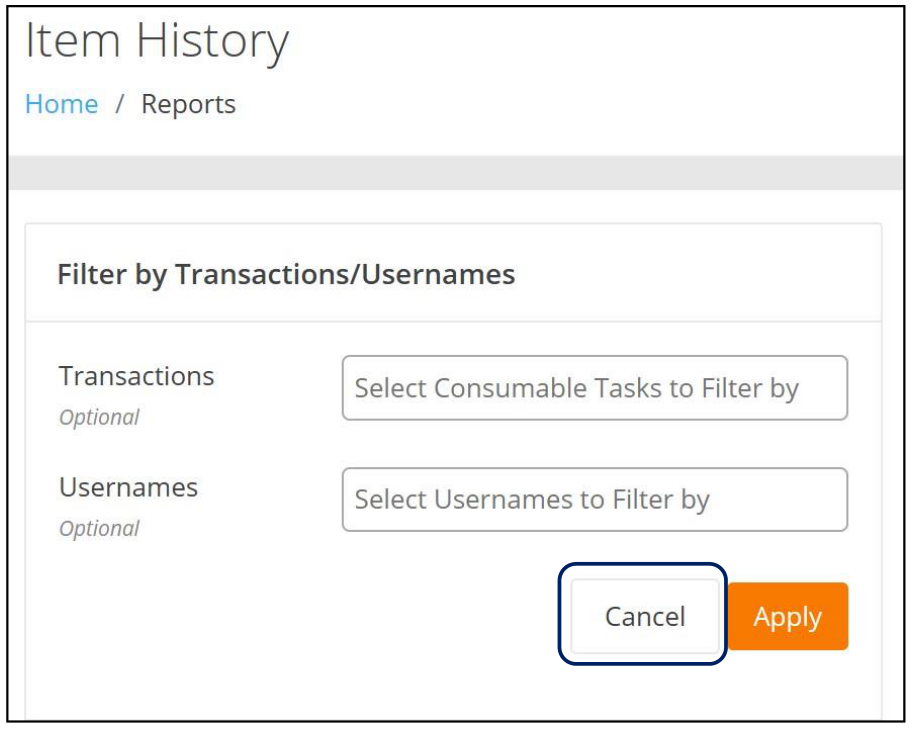
A Cancel button has been incorporated into the Item History Report which provides the User with the option to cancel the Filter by Transaction and Filter by Usernames selections.
Fixed
- The ability to Add or Update a Site Reorder Point now requires the following two fields when adding or editing an item via an Item Import:
- Reorder Point Site
- Reorder Point Minimum Quantity
- The Item History page's failure to load due to an unexpected character has been resolved.
- On the Item History page, the User is now able to Filter or Search by Username and Transaction.
- An import file that contains UDF Date and Date-Time fields are properly placed in their respective fields on the Receiving and Picking pages.
- On the Inventory page, Quantity Adjustment and Unit of Measure Conversion are no longer allowed for Container Inventory.
- When performing a Pick Item, the Quantity Field Validation Message now displays the proper message when the Quantity Entered is greater than the Quantity Available.
Mailroom
Improvements
- The Package Signature box is now clickable and expandable.
Fixed
When viewing a Package, the thumbnail can now be expanded to display a full view of the image; however, when a package has multiple images, this feature is only available for the first image.
Note: Expanding to a full view of the image applies to all statuses:
- Delivered
- Received
- Lost